S+

CompTIA Security+ SY0-701

Lesson 8 of 12 — Security Operations & Monitoring

Day 8 ← Course Home ← Lesson 7
Lesson 8 — Security Operations (Domain 4.0)

Security Operations & Monitoring

If you can't see it, you can't secure it. This lesson builds the SecOps mindset: baselining normal behavior, cataloging every asset, turning log noise into actionable alerts, and safely detonating suspicious files โ€” before an unknown device becomes a breach.

๐Ÿ“– 4 Topics ๐ŸŽฎ 4 Activities ๐Ÿ“ 12-Question Quiz โฑ ~4 hrs Domain: Security Operations

By the end of this lesson, you will be able to:

  • Define system baselines and explain how drift detection identifies anomalies from the expected secure state.
  • Build and maintain an asset inventory using active and passive discovery techniques combined with CMDB principles.
  • Distinguish log types (event, system, security, application) and configure SIEM alert thresholds to catch attacks without generating excessive false positives.
  • Explain the role of sandboxing in safe malware analysis and unknown-file behavioral detonation.
  • Apply continuous monitoring principles to detect rogue devices and policy violations in real time.
  • Map SecOps controls โ€” FIM, NAC, 802.1X, SIEM, SOAR โ€” to CompTIA Security+ SY0-701 exam objectives 4.3, 4.4, 4.5, and 4.6.
Baseline
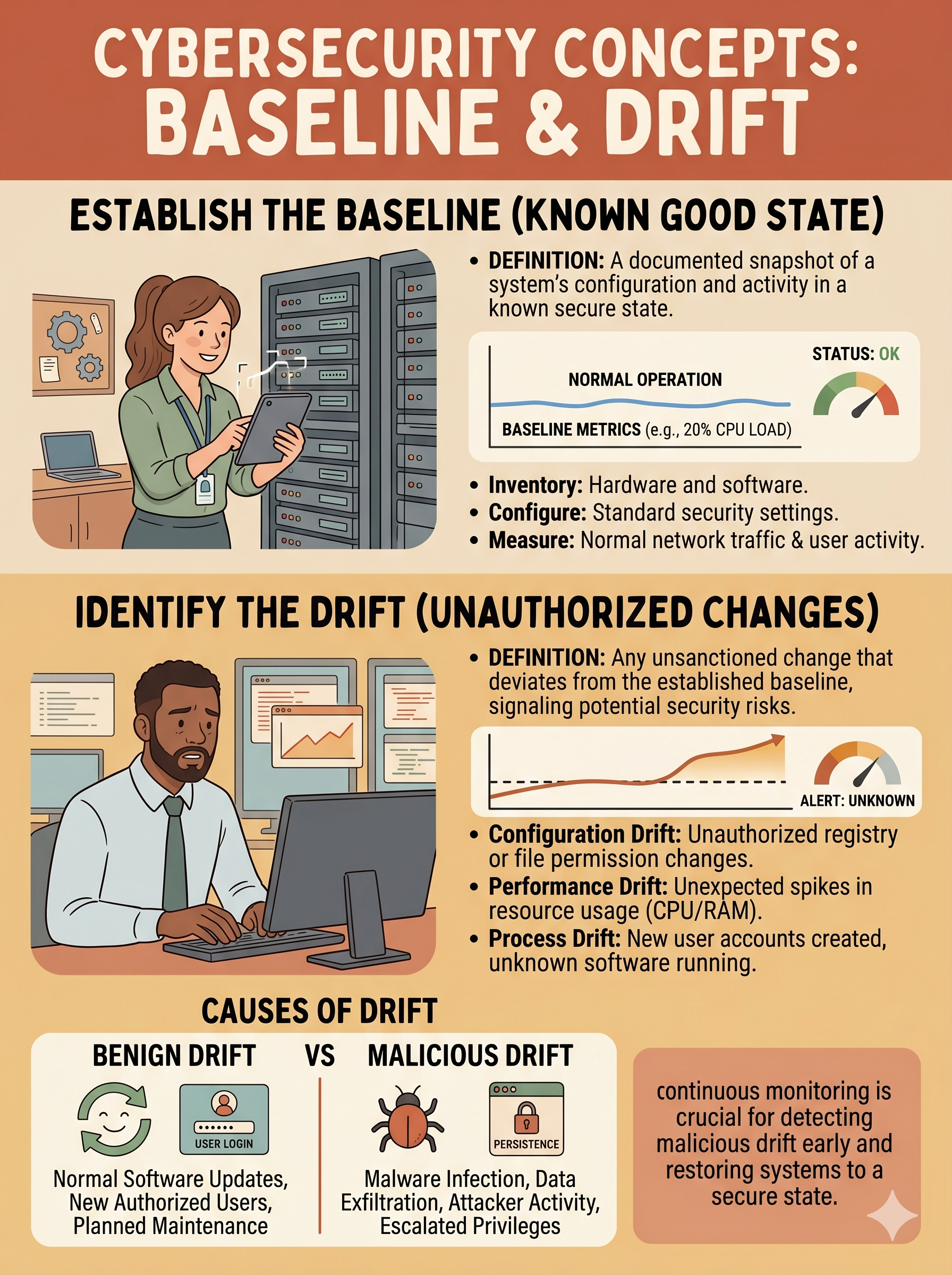
A documented snapshot of a system's normal, secure configuration state โ€” the authoritative reference for drift detection.
Configuration Drift
Any deviation from an established baseline โ€” authorized (patching) or unauthorized (intrusion). Drift on an unpatched server with no change ticket is a potential compromise indicator.
Asset Inventory / CMDB
A comprehensive register of all hardware, software, and data assets. The Configuration Management Database (CMDB) is the authoritative source of asset truth โ€” you cannot protect what you don't know exists.
SIEM
Security Information and Event Management โ€” aggregates logs from across the environment, normalizes formats, correlates events, and fires alerts when configured thresholds are exceeded.
Indicator of Compromise (IoC)
Forensic evidence that an intrusion has occurred or is in progress โ€” such as a known malicious IP, unusual outbound transfer volume, or unauthorized registry key modification.
Sandbox
An isolated execution environment where suspicious files detonate freely and reveal their behavior โ€” network calls, registry writes, process spawning โ€” without risk to production systems.
Rogue Device
An unauthorized device connected to the network โ€” whether brought in by an insider or deployed by an attacker. Every rogue device is a potential data exfiltration vector and lateral movement pivot.
802.1X / NAC
Port-based Network Access Control requiring device authentication before network access is granted. Unauthenticated devices are isolated to a quarantine VLAN โ€” the primary technical control against rogue device connectivity.

Every advanced attacker has one thing in common: they rely on their victims not being able to see them. They operate in environments where no one knows every device on the network, where logs are collected but never reviewed, and where a configuration change that opened a Telnet port goes unnoticed for months. Security Operations is the discipline that eliminates those blind spots.

The four pillars of this lesson โ€” baseline management, asset inventory, log analysis, and safe malware investigation โ€” form the visibility layer that makes every other security control effective. Without this layer, your firewall may be blocking known threats while an attacker you don't know about moves freely inside your network at 2:47 AM, exfiltrating 847MB of data before going offline undetected.

๐Ÿ”Œ The New Laptop on the Network โ€” 2:47 AM

At 2:47 AM on a Tuesday, a DHCP lease is assigned to a device no one in IT recognizes. The MAC address doesn't match any entry in the asset inventory. Within 12 minutes, the device queries the Active Directory LDAP server, attempts three failed SMB connections to the file server, and downloads 847MB of data before going offline. By 9 AM, no one in IT knows this happened โ€” because no alert was configured.

Discussion questions: What monitoring controls would have detected this? What should have triggered an alert? What does an attacker gain by operating at 2:47 AM specifically? Which of the four topic areas in this lesson addresses each failure?

01

Baselines & Configuration Drift

What constitutes a secure baseline โ€” and how unauthorized deviations become attacker footholds.

๐Ÿ”„ Click to flip

Baselines & Drift

A baseline documents every measurable security attribute: open ports, services, accounts, file hashes. CIS Benchmarks and STIGs define the standard. FIM detects unauthorized changes the moment they occur. Unauthorized drift on a production server = potential compromise.

02

Asset Inventory & Discovery

Active vs. passive discovery, CMDB architecture, and NAC enforcement for rogue device prevention.

๐Ÿ”„ Click to flip

Asset Inventory

You cannot protect what you don't know exists. Active discovery (Nmap, Nessus) probes devices directly. Passive discovery (DHCP logs, ARP analysis) observes without probing. The CMDB is your authoritative asset register. 802.1X enforces authentication before any device accesses the network.

03

Log Management & SIEM

Log taxonomy, Windows Event IDs, alert threshold design, and brute-force detection rules.

๐Ÿ”„ Click to flip

Logging & SIEM

SIEM aggregates → normalizes → correlates → alerts. Key Event IDs: 4624 (logon), 4625 (failed), 4648 (explicit creds), 4720 (account created). Threshold design: too high misses attacks; too low creates alert fatigue. SOAR automates response when the alert fires.

04

Sandboxing & Malware Analysis

Static vs. dynamic analysis, safe file detonation workflows, and anti-sandbox evasion awareness.

๐Ÿ”„ Click to flip

Sandboxing

Static analysis: examine without executing (strings, hash, PE header). Dynamic: execute in isolation and observe network calls, registry writes, process spawning. VM-based (Cuckoo), cloud (VirusTotal). Anti-sandbox evasion: malware detects VM artifacts and stays dormant to avoid analysis.

1

Baselines & Configuration Drift Detection

Establishing the secure state and detecting when it changes โ€” authorized or otherwise

A security baseline is a documented snapshot of every measurable attribute of a system in its known-good, secure state: open ports, running services, installed software versions, local user accounts, registry keys, and file hashes. The baseline is your reference point. Any deviation is drift โ€” and drift must be explained.

Analogy โ€” Hotel Room Standard Setup: A newly renovated hotel room has a "standard setup" photo taken and placed on file. Every morning, housekeeping compares the room to that photo. A missing towel, moved furniture, or extra device plugged in triggers investigation. The baseline is the photo; FIM is housekeeping.

๐Ÿ“ What a Baseline Documents

  • Open ports โ€” which ports are legitimately listening
  • Running services โ€” what processes should be active at boot
  • User accounts โ€” no guest, no unnamed local admins
  • Installed software โ€” version and hash of approved binaries
  • Registry keys โ€” critical security configuration values
  • File hashes โ€” SHA-256 fingerprints of system binaries

โš ๏ธ Types of Drift

  • Authorized drift โ€” documented, approved change (patch deployment, config update with change ticket)
  • Unauthorized drift โ€” unexplained deviation โ€” potential indicator of compromise or insider action
  • Cumulative drift โ€” small authorized changes accumulating into an insecure posture over time
A Telnet port open on a web server that hasn't been patched in 127 days and has no change ticket = unauthorized drift = mandatory investigation.

Baseline Standards & Enforcement Tools

๐Ÿ“‹ CIS Benchmarks

Community-consensus hardening guidelines published by the Center for Internet Security. Cover every major OS, cloud platform, and application. Prescribe specific settings โ€” not general principles.

๐Ÿ›๏ธ STIG

Security Technical Implementation Guides โ€” DoD-mandated hardening specifications. More prescriptive than CIS Benchmarks. Required for federal systems and many defense contractors.

๐Ÿ” FIM โ€” File Integrity Monitoring

Monitors cryptographic hashes of critical system files and configurations. Fires an alert the moment any monitored file is added, modified, or deleted โ€” catching malware implants and unauthorized config changes.

Security+ Exam Mapping โ€” Obj 4.3: Baseline configuration, change management, and drift detection are tested directly. Expect questions that present a scenario with an unexpected open port or service and ask you to identify the correct term (configuration drift) and the appropriate monitoring control (FIM, SIEM, configuration auditing).
2

Asset Inventory & Discovery

You cannot protect what you don't know exists โ€” cataloging every device on the network

Every connected device is an attack surface. An asset inventory combines automated discovery with a maintained Configuration Management Database (CMDB) to ensure that every device โ€” workstation, server, printer, IoT sensor, contractor laptop โ€” is catalogued, owned, and monitored. Uncatalogued assets are invisible liabilities.

Library Catalog Analogy: Every book in a library has a catalog record. An uncatalogued book cannot be found, cannot be checked out, and may be stolen without anyone knowing it's missing. The CMDB is your catalog โ€” every uncatalogued network device is a hidden liability and potential attacker foothold.

๐Ÿ”Ž Active Discovery

Directly probes the network to enumerate devices. Generates network traffic โ€” visible to defenders and potentially to attackers monitoring for scans.

  • Nmap โ€” host discovery, port scanning, OS fingerprinting, service version detection
  • Nessus / Tenable โ€” authenticated vulnerability scans with CMDB export
  • Ping sweeps / ICMP โ€” basic host availability check across subnets

๐Ÿ‘‚ Passive Discovery

Observes existing network traffic without generating new probe packets. Stealthier and less disruptive than active scanning โ€” misses devices that are offline during the observation window.

  • DHCP lease log analysis โ€” reveals every device that requested an IP, including MAC address and hostname
  • ARP table monitoring โ€” maps IP-to-MAC bindings on each subnet
  • Traffic flow analysis โ€” identifies communicating devices without probing

Rogue Device Prevention โ€” NAC & 802.1X

๐Ÿ”’ 802.1X โ€” Port-Based Authentication

IEEE standard requiring devices to authenticate before being granted network access at the switch port level. Unauthenticated devices are placed in a quarantine VLAN with no access to production resources โ€” the primary technical control against rogue device connectivity.

  • Supplicant โ€” the device requesting access (client software)
  • Authenticator โ€” the network switch or wireless AP
  • Authentication Server โ€” RADIUS server (e.g., FreeRADIUS, NPS)

๐Ÿ›ก๏ธ NAC โ€” Network Access Control

Policy enforcement system that evaluates device health and identity before granting access. Combines 802.1X authentication with posture assessment (is the device patched? does it have AV? is it domain-joined?).

  • Pre-admission checks: AV current, OS patched, domain-joined
  • Post-admission monitoring: continuous compliance enforcement
  • Quarantine VLAN for non-compliant or unknown devices
The 2:47 AM Rogue Device โ€” What Should Have Fired: (1) SIEM alert on DHCP lease to unknown MAC โ€” immediate flag; (2) 802.1X would have blocked network access entirely โ€” the device would have been quarantined before it queried LDAP; (3) Passive discovery running nightly would have caught the new ARP entry; (4) SIEM correlation of LDAP query + 3 SMB failures + 847MB transfer from same IP within 12 minutes = high-confidence incident alert.
3

Log Management & SIEM Architecture

Turning log noise into actionable security alerts โ€” and catching attacks before the damage is done

Logs are the security camera footage of your infrastructure. Every authentication, connection, configuration change, and error is recorded somewhere. The challenge isn't collection โ€” it's making sense of millions of log lines across hundreds of systems and firing the right alert at the right moment.

Casino Surveillance Analogy: A casino surveillance system doesn't record everything with equal priority โ€” it has motion sensors, face recognition triggers, and a security team that only responds when the system flags anomalies. SIEM is your casino surveillance for the network: collecting everything, correlating patterns, and surfacing only what requires human attention.

Key Windows Event IDs โ€” Security+ Exam Focus

Event ID Meaning Attack Relevance
4624Successful logonAfter multiple 4625s, a 4624 = successful brute-force
4625Failed logon attemptMultiple in short window = brute force / credential stuffing
4648Logon with explicit credentialsPass-the-hash, lateral movement, credential reuse
4720User account was createdPersistence โ€” attacker creating backdoor account

๐Ÿ“Š SIEM Architecture โ€” Four Layers

  • Collection โ€” Agents, syslog forwarders, and API connectors pull logs from every source
  • Normalization โ€” Different log formats (Windows, Linux, Cisco) converted to a common schema
  • Correlation โ€” Rules engine matches patterns across sources (e.g., 4625 × 8 + same IP + 4624 = brute force success)
  • Alerting โ€” Analyst notification and optional SOAR automation trigger when rules fire

โš–๏ธ Alert Threshold Design

The most critical SIEM configuration decision is threshold calibration:

  • Too low (alert on >2 failures) → alert fatigue, analysts ignore real threats
  • Too high (alert on >50 failures) → attacker slips through at 23 failures
  • Industry standard โ€” >5 failures within 60 seconds from same source = brute-force alert
  • SOAR โ€” Security Orchestration, Automation, and Response โ€” automates containment (isolate IP, disable account) when alert fires
4

Sandboxing & Safe Malware Analysis

Isolating and detonating suspicious files to extract behavioral intelligence without risk to production

Traditional AV scanning uses signatures โ€” known patterns of malicious code. It misses novel malware, obfuscated scripts, and fileless attacks entirely. Sandboxing complements signature detection by executing a suspicious file in complete isolation and observing every action it takes: network connections, registry modifications, file writes, process spawning.

Bomb Disposal Analogy: A suspicious package isn't opened in a crowd โ€” it's taken to a blast-proof containment room. Analysts observe the detonation safely, then extract forensic evidence. A sandbox is the blast-proof room for suspicious files โ€” full detonation, complete observation, zero risk to production.

๐Ÿ”ฌ Static Analysis

Examine the file without executing it:

  • Hash comparison โ€” SHA-256 against known-malicious databases (VirusTotal)
  • String extraction โ€” hardcoded IPs, domain names, registry keys visible in the binary
  • PE header analysis โ€” compilation date, entropy (high entropy = likely packed/encrypted)
  • Signature scanning โ€” AV heuristics and YARA rule matching

๐Ÿงช Dynamic Analysis (Sandbox)

Execute in isolation and observe runtime behavior:

  • Network calls โ€” C2 server contact, DNS queries for malicious domains
  • Registry modifications โ€” persistence keys, disabling security controls
  • File system writes โ€” dropping additional payloads, encrypting files
  • Process spawning โ€” injecting into legitimate processes for evasion

Sandbox Platforms & Evasion Awareness

๐Ÿ–ฅ๏ธ VM-Based

Cuckoo Sandbox, Any.run โ€” full OS isolation with snapshot/restore. Captures all system calls. Requires infrastructure investment.

โ˜๏ธ Cloud-Based

VirusTotal, Hybrid Analysis, Joe Sandbox โ€” community intelligence, fast results, shared IoC database. Caution: samples uploaded are visible to other users.

๐Ÿ‘๏ธ Anti-Sandbox Evasion

Sophisticated malware detects VM artifacts (registry keys, hypervisor processes, screen resolution, MAC prefix) and remains dormant to avoid analysis. Counter: physical sandbox hardware, delayed detonation, environment obfuscation.

When NOT to Sandbox: Known-good, vendor-signed system binaries with verified hashes (e.g., notepad.exe from a trusted Microsoft update) do not benefit from sandboxing โ€” it wastes resources and adds no security value. Focus sandbox capacity on unknown files, external email attachments, and files with mismatched extensions or high entropy scores.
Obj 4.3
Asset & Change Management
Baselines, drift detection, CMDB, FIM, configuration auditing, CIS Benchmarks, STIGs
Obj 4.4
Log Monitoring & SIEM
Event IDs, syslog, SIEM architecture, alert thresholds, SOAR, correlation rules
Obj 4.5
Endpoint Detection & Response
Rogue device detection, 802.1X, NAC, asset discovery, quarantine VLAN
Obj 4.6
Sandboxing & Malware Analysis
Static vs. dynamic, VM/cloud sandbox types, anti-sandbox evasion, IoC extraction
Obj 2.4
Threat Intelligence & IoCs
STIX/TAXII, threat feeds, IoC types, threat intelligence sharing platforms
Activity A

๐Ÿ” Baseline Drift Detective

Identify configuration violations on a drifted production server

The right panel shows a web server that has drifted from its secure baseline. Click each row in the Drifted Server panel that violates the baseline. Find all 5 violations to complete the exercise. False clicks count against you.
โœ… Secure Baseline โ€” Production Web Server
SSH Port22 (disabled externally)
HTTP Port 80Redirect to HTTPS only
HTTPS Port 443Open โ€” TLS 1.3
Telnet (23)Disabled
FTP (21)Disabled
Local Admin AccountDisabled
Guest AccountDisabled
Antivirus ServiceRunning โ€” definitions current
Windows FirewallEnabled (all profiles)
Last Patch DateWithin 30 days
โš ๏ธ Current State โ€” Drifted Server (Click Violations)
SSH Port22 (disabled externally)
HTTP Port 80Open โ€” serving content directly
HTTPS Port 443Open โ€” TLS 1.3
Telnet (23)Open โ€” active listener
FTP (21)Disabled
Local Admin AccountEnabled โ€” no password set
Guest AccountDisabled
Antivirus ServiceStopped โ€” definitions 47 days old
Windows FirewallEnabled
Last Patch Date127 days ago
0 of 5 violations found  ยท  0 false clicks
Activity B

๐Ÿ“ก The Asset Hunter

Identify known assets and flag rogue devices on your network

You are the network administrator. Review each discovered device and either Tag it as a known authorized asset or Flag it as suspicious or rogue. Complete all devices to generate the incident report.
Activity C

๐Ÿ“œ Log-to-Alert Simulator

Configure SIEM thresholds and catch the brute-force attack before the data is gone

Set your SIEM alert thresholds below, then run the brute-force simulation. Did your rules catch the attack โ€” or did the attacker slip through undetected?

โš™๏ธ SIEM Alert Threshold Configuration

๐Ÿ”ด Failed Login Alert: more than failed logins within seconds
๐ŸŸก Port Scan Alert: more than unique ports scanned in seconds
๐Ÿšจ SIEM ALERT FIRED: Threshold exceeded โ€” possible brute-force attack in progress!
// Log stream ready. Configure thresholds and run the simulation.
Activity D

๐Ÿ“ฆ Sandbox Decision Engine

Route each suspicious file to the correct analysis action

Drag each file from the tray to the appropriate action zone: Run Normally, Scan First, or Sandbox. Consider the file's origin, digital signature status, and any behavior indicators before deciding.
File Tray โ€” Pending Review
Action Zones โ€” Drag Files Here
โ–ถ Run Normally (Low risk โ€” known trusted file)
๐Ÿ” Scan First (Moderate โ€” AV scan before execution)
๐Ÿ“ฆ Sandbox (High risk โ€” isolated detonation)
12 Questions 10 MC + 2 Scenario

๐Ÿ“ Security+ Exam Prep Quiz

Lesson 8: Security Operations & Monitoring ยท SY0-701 Objectives 4.3 โ€“ 4.6