S+

CompTIA Security+ SY0-701

Lesson 9 of 12 — Vulnerability Management & Incident Response

Day 9 ← Course Home ← Lesson 8
Lesson 9 — Security Operations (28% of exam)

Vulnerability Management & Incident Response

Finding vulnerabilities before attackers do, triaging and remediating them by risk, and — when attacks succeed — executing a structured incident response, conducting root cause analysis, and preserving forensic evidence that stands up to scrutiny.

📖 3 Topics 🎯 2 Activities 📝 5-Question Quiz ⏱ ~60 min Domain: Security Operations

By the end of this lesson, you will be able to:

  • Explain the vulnerability management lifecycle — scanning, analysis, remediation, and validation — and describe what happens at each stage.
  • Compare credentialed and non-credentialed vulnerability scans and justify which scan type is appropriate for a given scenario.
  • Apply a risk-based prioritization framework to a list of scan findings, using CVSS score, asset criticality, and exploitability to determine remediation order.
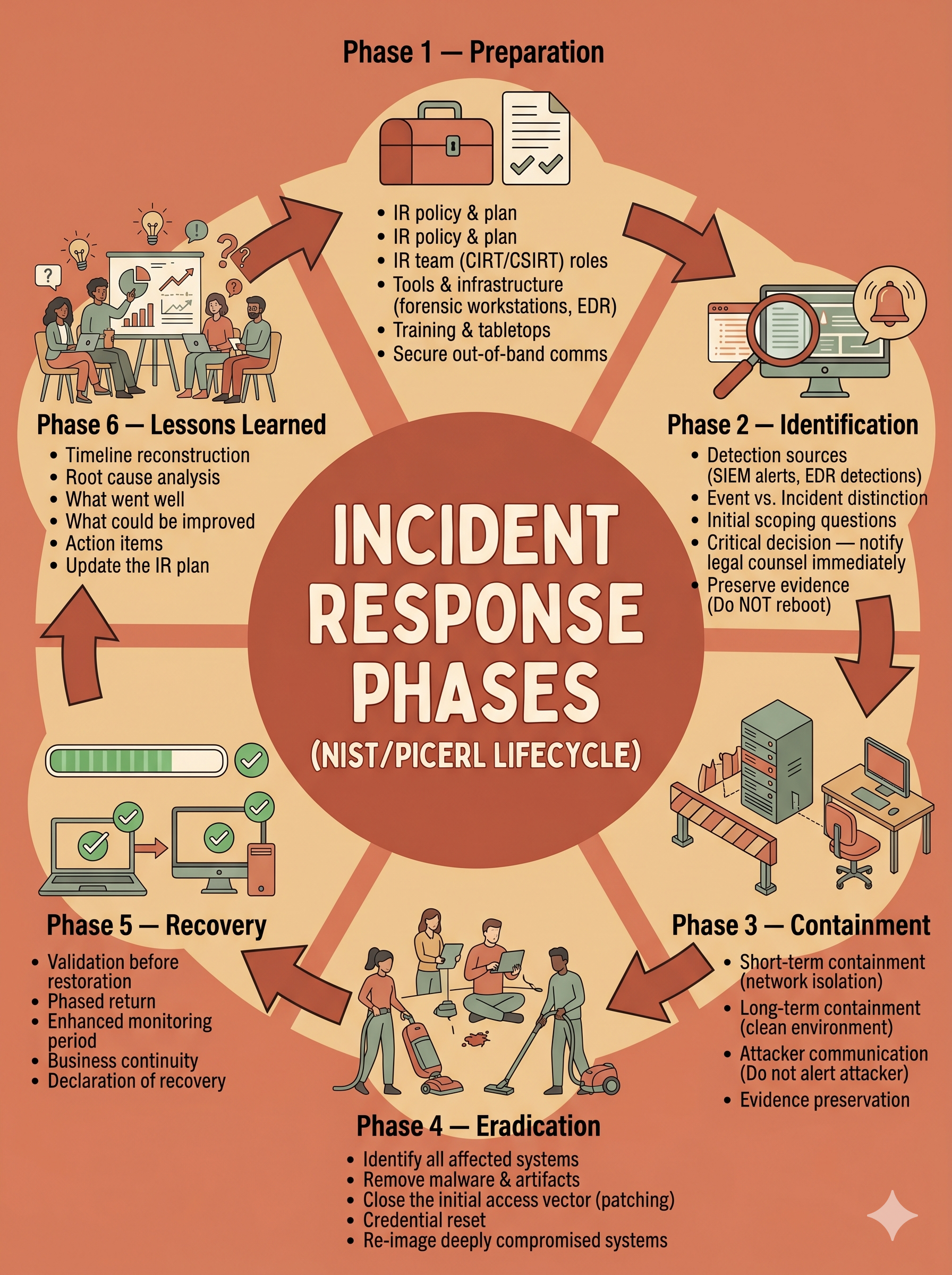
  • Outline the six phases of the NIST/PICERL incident response lifecycle and describe the key activities, decisions, and outputs of each phase.
  • Distinguish root cause analysis from symptom remediation and explain how lessons-learned activities improve future security posture.
  • Describe the principles of digital forensics — chain of custody, order of volatility, write blockers, and forensic imaging — and explain why each is essential for evidence admissibility.
  • Select appropriate IR actions and forensic procedures for a described security incident scenario.
Vulnerability Scan
An automated process that probes systems, applications, and network devices for known security weaknesses — misconfigurations, missing patches, default credentials, and software flaws — and produces a prioritized report of findings mapped to CVE identifiers and CVSS scores.
Remediation
The process of eliminating or reducing a vulnerability to an acceptable risk level. Remediation may involve patching, configuration changes, removing a vulnerable component, implementing a compensating control, or formally accepting the risk when remediation is not feasible.
IR (Incident Response)
The structured process an organization follows to prepare for, detect, contain, eradicate, recover from, and learn from security incidents. A documented IR plan reduces the cost and duration of incidents and satisfies regulatory requirements for breach notification timelines.
Forensic Evidence
Digital or physical data collected during an investigation that is preserved and documented in a manner that maintains its integrity and admissibility. Forensic evidence must be collected using validated tools, documented with a chain of custody, and stored in a tamper-evident fashion.
Chain of Custody
A documented, unbroken record of who collected, handled, transferred, and analyzed a piece of evidence — and when. Breaks in chain of custody can render evidence inadmissible in legal proceedings or cast doubt on its integrity in regulatory investigations.
Root Cause Analysis (RCA)
A structured investigation technique used during the post-incident lessons-learned phase to identify the fundamental underlying cause of an incident — not just its symptoms. RCA ensures that remediation addresses the actual problem so the same incident does not recur.
CVSS (Common Vulnerability Scoring System)
A standardized 0–10 scoring framework for rating vulnerability severity. CVSS base scores consider attack vector, complexity, privileges required, user interaction, and CIA impact. Used as a primary input for vulnerability prioritization decisions.
Order of Volatility
The principle that forensic evidence should be collected in order from most volatile (data that disappears quickest) to least volatile. RAM contents and running processes disappear the moment power is cut; hard drive contents and log files persist. Collecting volatile evidence first preserves data that would otherwise be permanently lost.

Security professionals live in two modes: proactive and reactive. Vulnerability management is the proactive mode — finding weaknesses in your environment before an attacker does, assessing their real-world risk, fixing the highest-priority issues first, and verifying the fix worked. Incident response is the reactive mode — the structured process that kicks in when a security event occurs, requiring disciplined decision-making under pressure to contain damage, eradicate the threat, recover operations, and learn from what happened.

Both disciplines are tested heavily in the Security Operations domain, which carries 28% of the Security+ exam — the single highest-weighted domain. CompTIA tests these topics almost entirely through scenario questions: you will read an incident description and be asked what the next correct IR action is, or you will see a vulnerability scan output and be asked which finding to remediate first. Mastering the frameworks in this lesson — the vulnerability management lifecycle and the PICERL incident response lifecycle — gives you the mental model to answer those questions correctly every time.

01

Vulnerability Management Lifecycle

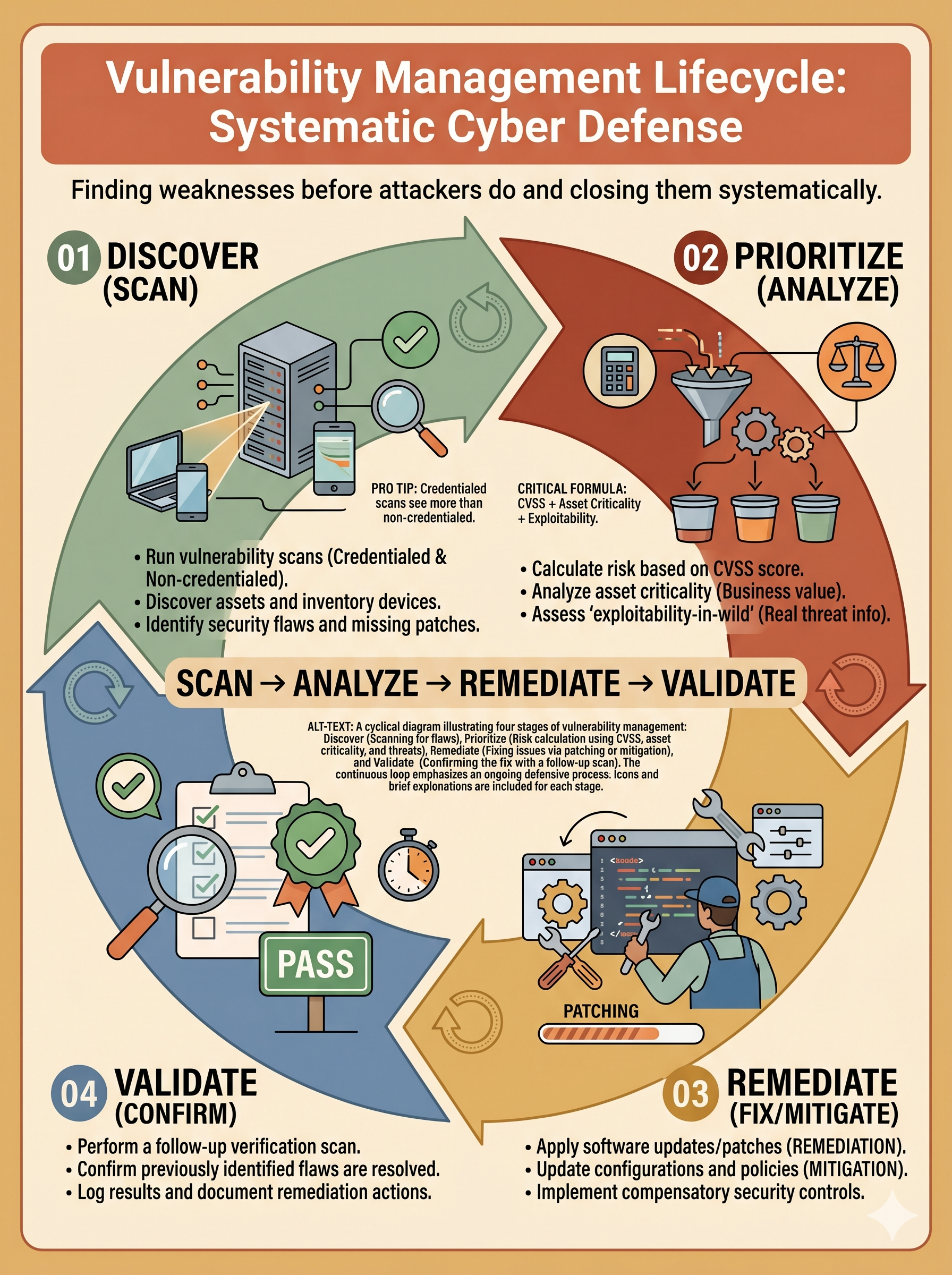
Scanning, analysis, remediation, and validation — finding weaknesses before attackers do and closing them systematically.

🔄 Click to flip

Vulnerability Management

The lifecycle: scan (discover weaknesses) → analyze (prioritize by risk) → remediate (patch, configure, mitigate) → validate (confirm the fix worked). Credentialed scans see more than non-credentialed. CVSS + asset criticality + exploitability-in-wild drives remediation order.

02

Incident Response Phases

The PICERL lifecycle — Preparation, Identification, Containment, Eradication, Recovery, and Lessons Learned — and the critical decisions at each phase.

🔄 Click to flip

Incident Response Phases

IR is not improvised — it follows a documented playbook. Preparation builds the capability before an incident. Identification determines that an incident is real. Containment stops the bleeding. Eradication removes the threat. Recovery restores operations. Lessons Learned prevents recurrence.

03

Root Cause Analysis & Digital Forensics

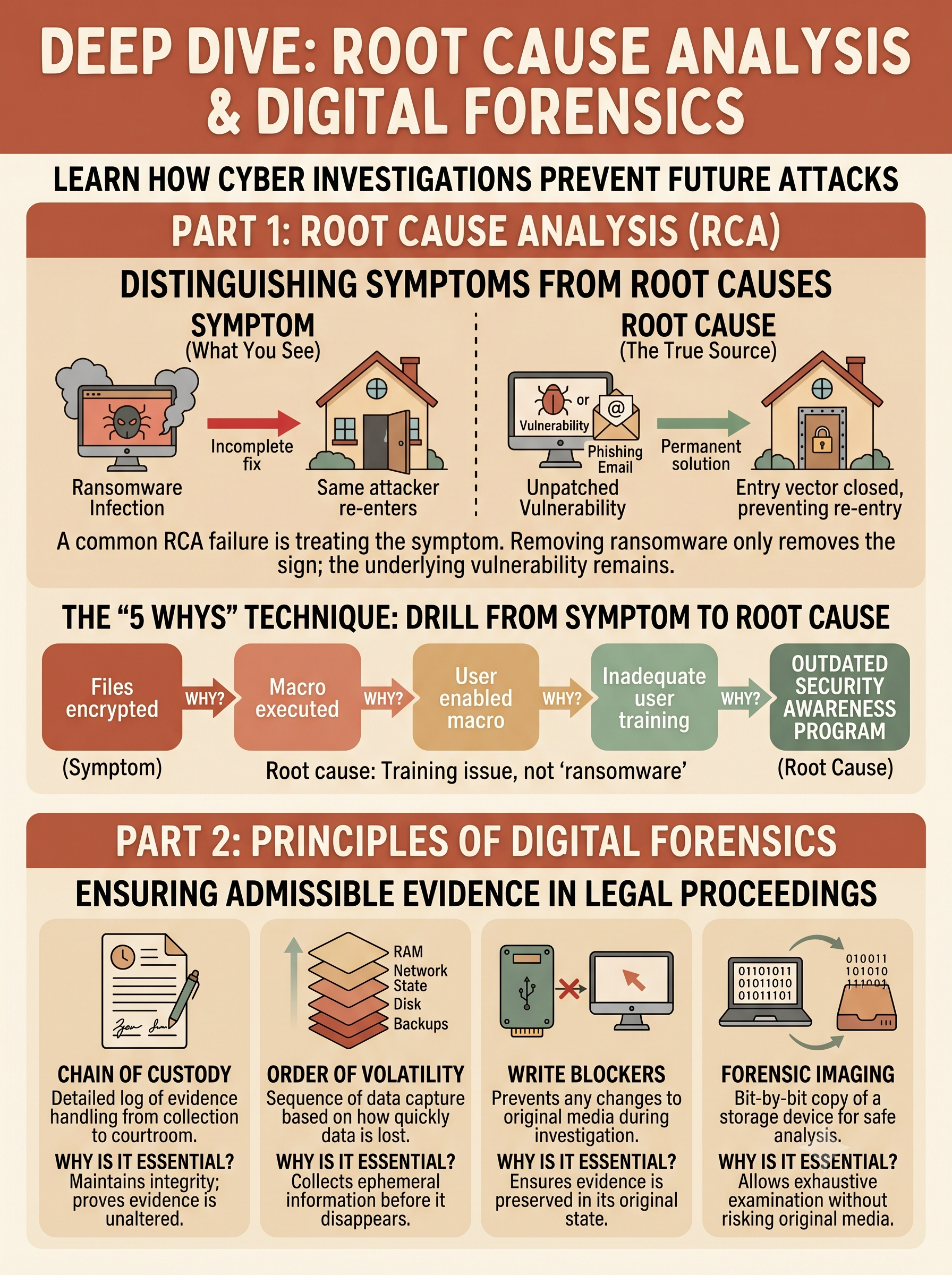
Why the attack succeeded — and how to collect, preserve, and analyze evidence that proves it in legal and regulatory proceedings.

🔄 Click to flip

RCA & Digital Forensics

RCA distinguishes root causes from symptoms — fixing only the symptom means the same attack succeeds again. Forensics requires: collect volatile evidence first (RAM before disk), maintain chain of custody, use write blockers, create forensic images, and never work on originals.

1

Vulnerability Management Lifecycle

Scanning, analysis, remediation, and validation — finding weaknesses systematically before attackers do

Vulnerability management is a continuous cycle, not a one-time project. Every organization has vulnerabilities — the goal is not to achieve zero vulnerabilities (impossible) but to identify, prioritize, and eliminate the highest-risk ones faster than attackers can exploit them.

Analogy — The Building Inspector: Think of vulnerability management like a building inspector who visits every floor of an office tower on a regular schedule. The scan is the inspection visit — walking every room, checking every outlet, testing every door. The analysis is the inspection report — prioritizing items by safety risk (a gas leak is fixed today; a loose doorknob can wait). Remediation is the repair work. Validation is the re-inspection to confirm the repairs passed code. Without the re-inspection, you don't actually know if the problem was fixed.

Phase 1: Vulnerability Scanning

🔍 Credentialed vs. Non-Credentialed Scans

Non-credentialed (unauthenticated): The scanner connects to the target like an attacker would — without login credentials. It can only detect vulnerabilities visible from the network: open ports, service banners, exposed web interfaces, and publicly exploitable conditions.

Credentialed (authenticated): The scanner is provided valid credentials (admin/service account) and logs into each target system. It can read installed software versions, registry keys, configuration files, and applied patches — providing a far more complete and accurate picture of the vulnerability landscape.

  • Credentialed scans find ~5–10x more vulnerabilities than non-credentialed scans on the same target
  • Exam tip: If a scenario asks which scan gives more accurate results or finds more vulnerabilities — credentialed is always the answer

🌐 Scan Types and Placement

Internal scan: Conducted from inside the network — finds vulnerabilities that an insider or already-compromised system could exploit. Represents the attacker's post-initial-access view.

External scan: Conducted from outside the network perimeter — simulates an attacker's view from the internet. Identifies what is exposed to the public and exploitable without prior network access.

Agent-based scan: A lightweight agent installed on each endpoint continuously reports vulnerability status. Provides real-time visibility without needing to schedule scan windows or maintain scan credentials.

  • Common tools: Nessus (Tenable), Qualys, Rapid7 InsightVM, OpenVAS (open source)
  • Scan frequency: Critical assets: weekly minimum; standard assets: monthly; all assets after significant changes

Phase 2: Vulnerability Analysis & Prioritization

📊 Risk-Based Prioritization Framework

CVSS score alone is insufficient for prioritization. A CVSS 10.0 vulnerability on a test server with no sensitive data is less urgent than a CVSS 7.0 on an internet-facing payment system with an active exploit. The correct framework combines multiple factors:

  • CVSS Base Score: Severity rating (0–10) — first filter
  • Exploitability: Is there a public exploit or active exploitation in the wild? CISA KEV (Known Exploited Vulnerabilities) catalog is authoritative
  • Asset Criticality: What business function does this system perform? What data does it hold?
  • Exposure: Is this system internet-facing or internal-only?
  • Compensating controls: Are there existing controls (firewall rules, segmentation) that reduce exploitability even if the vulnerability exists?

🎯 Remediation Priority Tiers

A practical SLA framework for vulnerability remediation:

Critical (CVSS 9.0–10.0 + KEV): Remediate within 24–72 hours. Active exploitation reported. No compensating controls — patch immediately.
High (CVSS 7.0–8.9 or Critical on non-critical asset): Remediate within 7–14 days. Prioritize internet-facing systems first.
Medium (CVSS 4.0–6.9): Remediate within 30 days. Schedule during regular maintenance windows.
Low (CVSS 0.1–3.9): Remediate within 90 days or accept risk with documented justification.

Phase 3: Remediation — More Than Just Patching

🔄 Patching

The direct fix — vendor-supplied code that closes the vulnerability. The gold standard: eliminates the root cause. Requires testing before production deployment to avoid introducing service disruptions.

  • Test in staging environment first
  • Maintain a rollback plan
  • Track patching SLA compliance for audit purposes

🛡️ Mitigation

When a patch is not available (zero-day) or not immediately deployable (requires system downtime), mitigation reduces exploitability without eliminating the vulnerability:

  • WAF virtual patch blocks the specific exploit pattern
  • Disable the vulnerable service or feature
  • Network access restriction limits who can reach the vulnerability

✅ Risk Acceptance

For low-risk vulnerabilities where remediation cost exceeds the potential impact, the organization may formally accept the risk. This requires:

  • Documented risk acceptance signed by the asset owner and CISO
  • Defined acceptance period (not permanent)
  • Compensating controls documented
  • Scheduled for re-evaluation at next review cycle

Phase 4: Validation — Confirming the Fix

✔️ Why Validation Is Non-Negotiable

Applying a patch does not guarantee the vulnerability is closed. Patches can fail to install, can be rolled back by other updates, or may not address the specific configuration that made the system vulnerable. Validation is the re-scan that proves the remediation worked.

  • Verification scan: Run the same vulnerability scan (same scope, same credentials) after remediation. Confirm the specific CVE no longer appears in the results.
  • Penetration test validation: For critical vulnerabilities, a manual penetration tester attempts to exploit the specific vulnerability post-remediation to confirm it is not reachable.
  • Compliance reporting: Validation scan results are the evidence submitted to auditors and regulators proving that required patches were applied within the required SLA window.

The vulnerability management lifecycle is a continuous loop — not a linear process. After validation, monitoring for new vulnerabilities in the same asset begins immediately. New CVEs for already-patched software versions can appear within days of the previous patch cycle closing.

False Positives vs. False Negatives in Scanning: A false positive is when a scanner reports a vulnerability that doesn't actually exist (often from incorrect version detection). A false negative is when a real vulnerability exists but the scanner misses it. Credentialed scans dramatically reduce both by directly querying installed software versions rather than inferring them from network responses.
2

Incident Response Phases — PICERL

The structured lifecycle that transforms chaos into disciplined response: Preparation, Identification, Containment, Eradication, Recovery, Lessons Learned

Incident response is not improvised — organizations that improvise under the pressure of an active attack consistently make costly mistakes: destroying evidence by rebooting systems, alerting attackers by changing credentials too early, or declaring recovery before the threat is fully eradicated. The PICERL framework (aligned to NIST SP 800-61) provides the mental model for disciplined IR decision-making.

Analogy — Responding to a Building Fire: The IR lifecycle maps perfectly to emergency response. Preparation = fire drills, extinguishers, and evacuation maps already in place. Identification = the smoke alarm goes off and someone confirms there's an actual fire (not a false alarm). Containment = close fire doors to stop the spread. Eradication = fire department puts out the fire. Recovery = inspect the building, repair damage, reopen. Lessons Learned = determine why the fire started and update fire prevention policies. Each phase must be completed before the next begins — you don't start rebuilding while the fire is still burning.
P

Phase 1 — Preparation

Everything you do before an incident occurs. Preparation determines whether your organization responds effectively or chaotically. No amount of technical skill during an incident compensates for missing preparation.

  • IR policy and plan: Documented procedures for every major incident type (ransomware, data breach, DDoS, insider threat) — including escalation paths and communication templates
  • IR team (CIRT/CSIRT): Defined roles: Incident Manager (coordinates), Technical Analyst (investigates), Communications Lead (stakeholder updates), Legal/Compliance liaison
  • Tools and infrastructure: Forensic workstations, EDR platform, SIEM configured and tuned, out-of-band communication channel (attackers may be monitoring email)
  • Training and tabletops: Regular tabletop exercises test the plan without the stakes of a real incident — exposes gaps before an adversary does
  • Secure out-of-band comms: During an incident, assume the attacker may be reading email — use an out-of-band channel (encrypted messaging, separate phone bridge) for sensitive IR coordination
I

Phase 2 — Identification

Detecting that a security event has occurred, determining whether it constitutes a confirmed incident, and characterizing its scope and severity. This phase is where alerts become incidents — or are triaged as false alarms.

  • Detection sources: SIEM alerts, EDR detections, user reports, threat intelligence feeds, external notification (FBI, CISA, partner disclosure)
  • Event vs. Incident: An event is any observable occurrence. An incident is an event that negatively impacts — or threatens to impact — confidentiality, integrity, or availability. Not every alert is an incident.
  • Initial scoping questions: What systems are affected? What data is at risk? Is the attacker still active? What is the likely initial access vector?
  • Critical decision — notify legal counsel immediately: If data may be breached, legal counsel must be notified early to protect privilege, manage regulatory notification timelines, and guide evidence handling
  • Preserve evidence: Do NOT reboot systems, delete logs, or take any action that destroys volatile forensic evidence — identification is when forensic collection begins
C

Phase 3 — Containment

Stopping the attack from spreading further while preserving evidence for investigation. Containment is a two-stage process: short-term (immediate stoppage) and long-term (stable, sustainable containment while eradication is prepared).

  • Short-term containment: Isolate infected endpoints from the network (EDR containment, VLAN quarantine, firewall block rule) — immediately. Do NOT power off if forensics is needed (RAM evidence is lost)
  • Long-term containment: Set up a clean environment alongside the compromised one if the business cannot tolerate downtime — run operations on clean systems while the compromised environment is investigated
  • Attacker communication: Do not alert the attacker to your awareness — avoid changing passwords, blocking IPs, or removing access until you are ready to eradicate. Tipping off the attacker may cause them to escalate or destroy evidence
  • Evidence preservation: Capture forensic images and memory dumps of contained systems before any remediation begins
E

Phase 4 — Eradication

Removing the threat — the attacker's tools, malware, persistence mechanisms, and unauthorized accounts — completely and verifiably from the environment. Partial eradication is worse than no eradication (it creates false confidence).

  • Identify all affected systems: Use forensic analysis and SIEM correlation to map every system the attacker touched — eradication is not complete until all footholds are removed
  • Remove malware and artifacts: Malware, web shells, scheduled tasks, registry keys, service installations, unauthorized user accounts
  • Close the initial access vector: Patch the vulnerability, disable the compromised account, or remove the attack entry point — or the attacker simply re-enters
  • Credential reset: Reset all credentials that may have been exposed — starting with privileged accounts. Consider resetting all Active Directory credentials for significant breaches
  • Re-image option: For deeply compromised systems, re-imaging from a known-good baseline is faster and more reliable than attempting manual cleanup of an unknown-depth compromise
R

Phase 5 — Recovery

Restoring affected systems and services to normal operations — but only after verifying the threat has been eradicated. Premature recovery that returns systems before the threat is gone restarts the incident cycle.

  • Validation before restoration: Scan restored systems with vulnerability scanner and EDR before connecting to production network
  • Phased return: Bring systems back incrementally — critical business systems first, then secondary systems — monitoring closely for signs of re-compromise
  • Enhanced monitoring period: Maintain elevated monitoring and alerting for 30–90 days post-recovery — recurrence attempts are common
  • Business continuity: If recovery will take days, implement business continuity plans — manual processes, backup systems, vendor escalation
  • Declaration of recovery: Formally declare the incident closed only when business operations are fully restored and sustained monitoring confirms no recurrence
L

Phase 6 — Lessons Learned

The most frequently skipped and most valuable phase. Lessons learned directly improves the organization's security posture and prepares for the next incident. Conducted as a structured after-action review within 1–2 weeks of incident closure.

  • Timeline reconstruction: Document the complete incident timeline — initial access, lateral movement, data impact, detection point, response actions, and resolution
  • Root cause analysis: Identify the fundamental cause (not just symptoms) — the control failure, process gap, or configuration weakness that enabled the incident
  • What went well: Identify effective response actions to formalize as standard procedures
  • What could be improved: Identify response gaps, communication failures, and missing tools or authority to act
  • Action items: Document specific, measurable improvement actions with owners and deadlines — lessons learned without action items are post-mortems, not improvements
  • Update the IR plan: Revise playbooks, detection rules, and procedures based on the incident's specific indicators and techniques
Exam Focus — Sequence Matters: Security+ scenario questions frequently describe an incident in progress and ask "what should the security team do NEXT?" The correct answer is almost always the next logical step in the PICERL lifecycle — not the most dramatic option. If the scenario describes detection (Identification phase), the next step is Containment — not immediately wiping the system (that skips Containment and destroys evidence) and not calling the press (that belongs in external communications during Recovery). Know the sequence: P → I → C → E → R → L.
3

Root Cause Analysis & Digital Forensics

Finding the underlying "why" behind an incident — and collecting evidence that proves what happened

Root cause analysis and digital forensics are closely linked: forensics collects the evidence, and RCA interprets that evidence to find the fundamental failure. Without RCA, organizations fix symptoms and face the same incident again. Without proper forensics, there is no evidence to support RCA — or legal proceedings.

Root Cause Analysis

🔎 Symptom vs. Root Cause

The most common RCA failure is treating the symptom as the root cause. A ransomware infection is a symptom — the root cause is usually one of: unpatched vulnerability, phishing email that bypassed email filtering and security awareness training, or credentials compromised and MFA not enforced.

If you only remove the ransomware (treat the symptom) without identifying and closing the initial access vector, the same attacker — or the next one — will re-enter through the same door within weeks.

  • The "5 Whys" technique: Ask "why?" five times to drill from symptom to root cause
  • Why were files encrypted? → Ransomware executed
  • Why did it execute? → Macro in Word document ran
  • Why did the macro run? → User enabled macros despite policy
  • Why did the user enable macros? → Not trained to recognize the phishing tactic
  • Why was training inadequate? → Security awareness program not updated in 3 years
  • Root cause: Outdated security awareness training — not "ransomware"

📋 RCA Outputs

A completed RCA produces three categories of outputs:

  • Technical findings: Specific CVE exploited, misconfiguration identified, control gap documented (e.g., "MFA was not enforced on VPN")
  • Process findings: Procedural gaps — the firewall rule exception was never reviewed, the offboarding checklist did not include revoking cloud access
  • People/training findings: Awareness gaps — users were not trained to recognize this social engineering technique; IR team did not know how to isolate an endpoint using EDR

Each finding maps to a corrective action with an owner, timeline, and success metric. RCA is not about blame — it is about systemic improvement. Organizations with mature incident response programs treat every incident as a learning opportunity, not a failure to hide.

Digital Forensics Principles

⚡ Order of Volatility — Collect Most Volatile First

Digital evidence exists on a spectrum from highly volatile (disappears within seconds of power loss) to highly persistent (survives storage for years). The order of collection must match this spectrum — collect the most volatile evidence first.

1. CPU registers & cache — lost in microseconds; captured via memory dump tools only
2. RAM (system memory) — lost immediately on power off; contains running processes, decrypted keys, active connections; use Volatility, WinPmem, or FTK Imager
3. Network state — active connections, ARP cache, routing table; use netstat -ano, arp -a
4. Running processes & servicesps aux, Task Manager export, process tree
5. Disk image (HDD/SSD) — least volatile; persists after power off; create forensic image with write blocker
6. Logs, backups, archives — remote logs (SIEM), backup media — most persistent evidence

🔒 Chain of Custody

Chain of custody is the documented, unbroken record proving that evidence was collected, handled, and stored without tampering. It is the forensic foundation for legal admissibility.

  • Documentation required: Who collected the evidence (date, time, location), cryptographic hash of the original (MD5/SHA-256) taken immediately after collection, every transfer of custody documented (who gave it to whom, when), storage conditions (locked evidence cabinet with access log)
  • Hash verification: A forensic image is hashed immediately after creation. Every time the image is accessed, the hash is re-verified — any change to the image produces a different hash, proving tampering
  • Work on copies only: Forensic analysis is always performed on a verified copy of the image — never on the original evidence. The original is preserved untouched
  • Legal implications: A broken chain of custody can render evidence inadmissible in civil or criminal proceedings and undermine regulatory investigations

Forensic Tools & Evidence Types

Evidence Type What It Contains Collection Method Key Forensic Value
RAM Image Running processes, decrypted files, active network connections, user sessions, registry hive loaded into memory, encryption keys Volatility, WinPmem, FTK Imager (live acquisition) — must be collected before power off Fileless malware only exists here; encryption keys for encrypted ransomware may be in RAM
Disk Image All files, deleted files (recoverable from unallocated space), file metadata (timestamps, ownership), partition tables, slack space Write blocker (hardware) + FTK Imager or dd — creates forensic copy while blocking any writes to the original Deleted malware artifacts, attacker tools, modified system files, timeline analysis
Network Capture (PCAP) All network traffic packets — full content (if unencrypted) or metadata (source/dest IP, port, timing, payload size) Wireshark, tcpdump, SPAN port mirror — ideally collected before incident is contained C2 communication patterns, data exfiltration volume/destination, lateral movement traffic
Log Files System events, authentication attempts, process execution, network connections — from OS, applications, and security tools Export from SIEM; local logs from /var/log/ (Linux) or Windows Event Viewer; preserve originals Authentication timeline, initial access evidence, attacker command execution, lateral movement path
Mobile Device Call logs, messages, photos, app data, location history, browser history, deleted data in flash memory Cellebrite UFED, Oxygen Forensics — device in airplane mode to prevent remote wipe; Faraday bag to block signals Insider threat evidence, attacker communication, location alibi verification
Write Blockers — The Forensic Non-Negotiable: A write blocker (hardware or software) prevents any write operations from reaching the evidence drive during forensic imaging. Without a write blocker, the act of connecting a drive to a forensic workstation can modify file access timestamps, swap file contents, and other metadata — altering the evidence. Hardware write blockers are preferred because they operate at the interface level and cannot be bypassed by software bugs. Using a write blocker is the baseline standard for forensically sound disk acquisition. Any disk image acquired without a write blocker may be challenged in legal proceedings.
Activity 1

Vulnerability Triage — Remediation Priority Sort

Sort each vulnerability finding into the correct remediation priority tier based on CVSS score, asset criticality, and exploitability

Instructions: Each chip represents a vulnerability finding from a recent enterprise scan. Drag it to the remediation priority tier that BEST reflects risk-based prioritization — considering CVSS score, asset exposure, and whether active exploitation exists. Submit for graded feedback.
CVSS 9.8 RCE on internet-facing web server — active Metasploit module exists
CVSS 7.5 SQLi on internal HR portal — no known public exploit
CVSS 5.3 information disclosure on dev server — internal access only
CVSS 8.1 on VPN gateway — listed in CISA KEV catalog
CVSS 2.1 cosmetic misconfiguration — test server, no data
CVSS 8.8 privilege escalation on domain controller — no public exploit yet
CVSS 6.1 XSS on internal wiki — authenticated users only
CVSS 3.5 outdated jQuery on static marketing site — no form inputs or data
Immediate (24–72 hrs)
High (7–14 days)
Medium (30 days)
Accept / 90-day cycle
Activity 2

Incident Response Scenario Analyzer

Select a real-world incident and answer questions about the correct IR phase actions, forensic procedures, and RCA findings

Instructions: Select a scenario tab. Read the incident description, then answer each question individually for graded feedback. Focus on applying the PICERL lifecycle and forensic principles correctly.
🔴 Scenario A: Ransomware at Midnight — Regional Logistics Company
At 11:47 PM, the on-call security analyst receives an EDR alert: 14 workstations are showing high-volume file encryption activity. A ransom note has appeared on several desktops. The SIEM shows that Patient Zero (a dispatch manager's laptop) connected to an external IP via SMB at 11:31 PM. The company operates 24/7 logistics operations — shutting down the network would ground all shipment tracking. The analyst is the only security staff on duty. The CTO is asleep. Legal counsel has not been notified. No IR playbook is open yet.
Q1: The analyst confirmed ransomware is actively spreading. Which action should the analyst take FIRST?
Q2: Three days after the incident is contained and eradicated, the IR team holds a post-incident review. The RCA reveals the ransomware entered via a phishing email that the dispatch manager opened, which installed a Trojan that exploited an unpatched Windows SMB vulnerability (CVE-2023-XXXX, CVSS 8.8) to spread. What is the TRUE root cause of this incident — and what is the correct remediation?
🟠 Scenario B: Suspected Insider Data Theft
A pharmaceutical company's DLP system alerts that a senior research scientist has uploaded 847 files containing proprietary drug synthesis data to a personal Dropbox account. The scientist submitted their resignation two days ago and their last day is Friday — three days away. HR has been notified. Legal counsel advises that this may constitute IP theft under the company's employment agreement and is preserving options for civil action. The scientist's laptop is a corporate-issued MacBook Pro. The scientist is currently working from home.
Q1: Legal counsel needs to preserve the evidence for potential civil litigation. What is the MOST forensically sound approach for collecting evidence from the scientist's corporate MacBook Pro?
Q2: The forensic image of the MacBook reveals the files were uploaded at 9:47 PM last Tuesday — 4 hours after the scientist's normal working hours. Browser history shows the Dropbox session originated from a coffee shop IP address. This evidence needs to be preserved for litigation. Which document is MOST critical for ensuring this evidence is legally admissible?
🔵 Scenario C: Web Server Compromise Discovered During Vulnerability Scan
A weekly vulnerability scan of a retail company's e-commerce web server returns a surprising result: the scanner's credentialed scan finds a web shell (cmd.php) in the web root directory that was not present in last week's scan. The web shell was created on a Tuesday at 2:14 AM — six days ago. The e-commerce site has been running normally. No customer-visible outage occurred. The security team has no idea what the attacker did during those six days. The server stores customer session tokens and processes credit card transactions (PCI DSS in scope).
Q1: The security team wants to understand exactly what the attacker did during the six days of access. Which combination of evidence sources would BEST provide a complete picture of attacker activity?
Assessment

Knowledge Check: Vulnerability Management & Incident Response

Select the best answer for each question, then submit for graded feedback
Question 1 of 5
A vulnerability scan reports a finding of CVSS 9.4 on an internal file server that stores only archived project documents with no regulatory classification. A separate scan finds a CVSS 6.8 vulnerability on an internet-facing customer portal that processes real-time credit card transactions, with a public proof-of-concept exploit available. Using risk-based prioritization, which finding should be remediated FIRST?
Question 2 of 5
A security analyst discovers that last week's vulnerability scan of a database server reported zero critical findings. However, a credentialed scan run this week on the same server identifies 14 critical CVEs, all related to unpatched Oracle database software. What is the MOST likely explanation for the discrepancy?
Question 3 of 5
During an active ransomware incident, a junior analyst suggests immediately powering off all affected servers to stop the encryption. The senior IR lead overrules this and directs the team to use EDR to network-isolate the affected endpoints while leaving them powered on. What is the MOST important reason for the senior lead's decision?
Question 4 of 5
A forensic investigator arrives at a scene where a suspected compromised Windows server is still powered on. The investigation requires collecting all available digital evidence in the correct order. Which sequence correctly applies the order of volatility principle?
Question 5 of 5
An organization suffers its third phishing-based credential compromise in 18 months. Each time, the IR team removes the malware, resets the affected account's password, and declares the incident closed. The CISO observes that the root cause analysis in each after-action report identifies "user clicked phishing link" as the root cause and recommends "additional user training." Why is this RCA methodology flawed, and what should the RCA process identify instead?