S+

CompTIA Security+ SY0-701

Lesson 6 of 12 — Network & Infrastructure Security

Day 6 ← Course Home ← Lesson 5
Lesson 6 — Security Architecture (18% of exam)

Network & Infrastructure Security

Firewalls, IDS/IPS, DNS filtering, NAC, DLP, and endpoint security — the layered control stack that defends the enterprise network, and the defense-in-depth strategy that makes individual controls effective together.

📖 3 Topics 🎯 2 Activities 📝 5-Question Quiz ⏱ ~60 min Domain: Security Architecture

By the end of this lesson, you will be able to:

  • Compare and contrast firewall types — packet filtering, stateful, NGFW, and WAF — and select the appropriate type for a described network scenario.
  • Distinguish between IDS and IPS by their detection methods, placement, and response capabilities, explaining when each is the correct choice.
  • Describe how DNS filtering, NAC, and DLP each address different threat vectors and data protection requirements in an enterprise environment.
  • Explain the role of endpoint security in a layered defense strategy, including EDR, application control, and host-based firewalls.
  • Map specific security controls to the threats they are designed to address, justifying the selection in the context of a described scenario.
  • Construct a defense-in-depth strategy for a described enterprise environment by selecting and sequencing controls that address multiple threat vectors simultaneously.
Firewall
A network security device (hardware or software) that monitors and controls incoming and outgoing network traffic based on a defined set of security rules. Firewalls establish a barrier between trusted internal networks and untrusted external networks.
IDS / IPS (Intrusion Detection / Prevention System)
IDS monitors network traffic and generates alerts when suspicious patterns are detected — it does not block traffic. IPS sits inline and actively blocks or drops malicious traffic in real time. Both use signature-based and anomaly-based detection methods.
NAC (Network Access Control)
A security solution that enforces policy-based access to the network by evaluating connecting devices against defined compliance requirements (OS version, patch level, antivirus status) before granting access. Non-compliant devices are quarantined or redirected.
DLP (Data Loss Prevention)
A set of tools and processes that detect and prevent the unauthorized transmission, storage, or use of sensitive data. DLP classifies data in use, in motion, and at rest, and enforces policies to block or alert on policy violations such as emailing a SSN or uploading a classified document to a personal cloud drive.
Endpoint Security
Security controls deployed on individual devices (workstations, laptops, mobile devices, servers) to detect, prevent, and respond to threats at the device level. Includes antivirus, EDR (Endpoint Detection and Response), host-based firewalls, and application control.
DNS Filtering
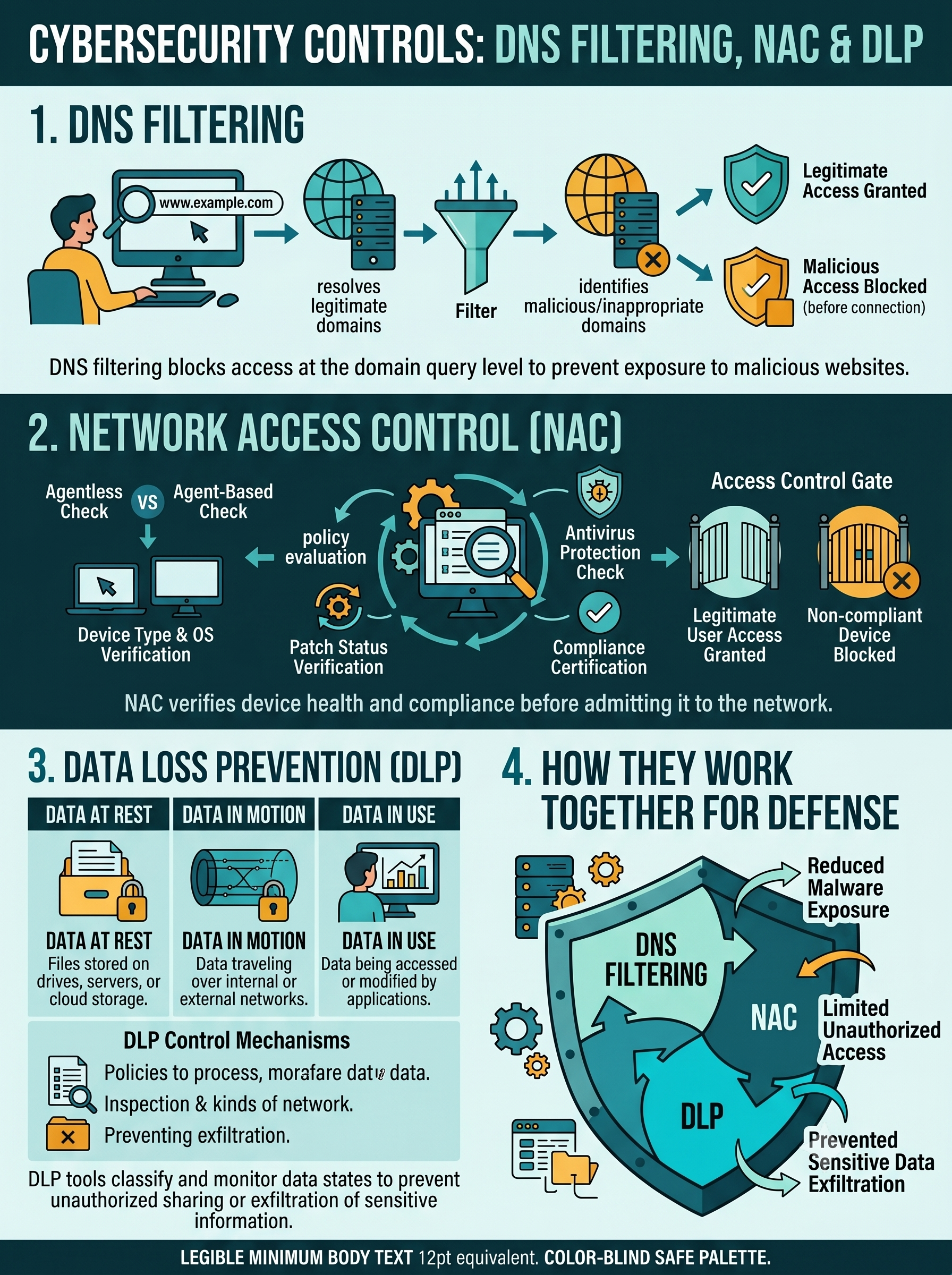
A security control that blocks access to malicious, unauthorized, or policy-violating domains by intercepting and evaluating DNS queries before resolution. Prevents connections to known malware C2 servers, phishing sites, and blocked content categories without requiring traffic decryption.
Defense in Depth
A security architecture strategy that layers multiple independent controls so the failure of any single control does not result in a complete compromise. Each layer slows or stops an attacker who has bypassed the previous layer, providing time for detection and response.
UTM (Unified Threat Management)
A security appliance that combines multiple security functions — firewall, IPS, antivirus, content filtering, VPN, and DLP — into a single device. Common in SMB environments where managing multiple point solutions is impractical. Enterprise environments typically use best-of-breed individual solutions.

In Lesson 5, you designed secure architectures — the blueprint. In this lesson, you populate that blueprint with the specific security controls that enforce it. Every enterprise network defense strategy relies on layering tools that detect, block, monitor, and respond at different points along an attacker's path. No single control stops every threat; a firewall cannot prevent an insider from emailing sensitive data, and a DLP solution cannot stop a port scan. The art is in selecting the right combination and understanding how they work together.

The Security Architecture domain tests your ability to do exactly this: read a scenario, identify which control addresses the specific threat described, and understand why the other options don't fit. This lesson teaches both the individual tools and the strategic framework — defense in depth — that connects them into a coherent enterprise defense posture. By the end of this lesson, you will be able to build a layered control map for any described enterprise environment and justify every control selection.

01

Firewalls & IDS/IPS

The network's gatekeepers — firewall types from packet filtering to NGFW, and the critical difference between detecting and blocking.

🔄 Click to flip

Firewalls & IDS/IPS

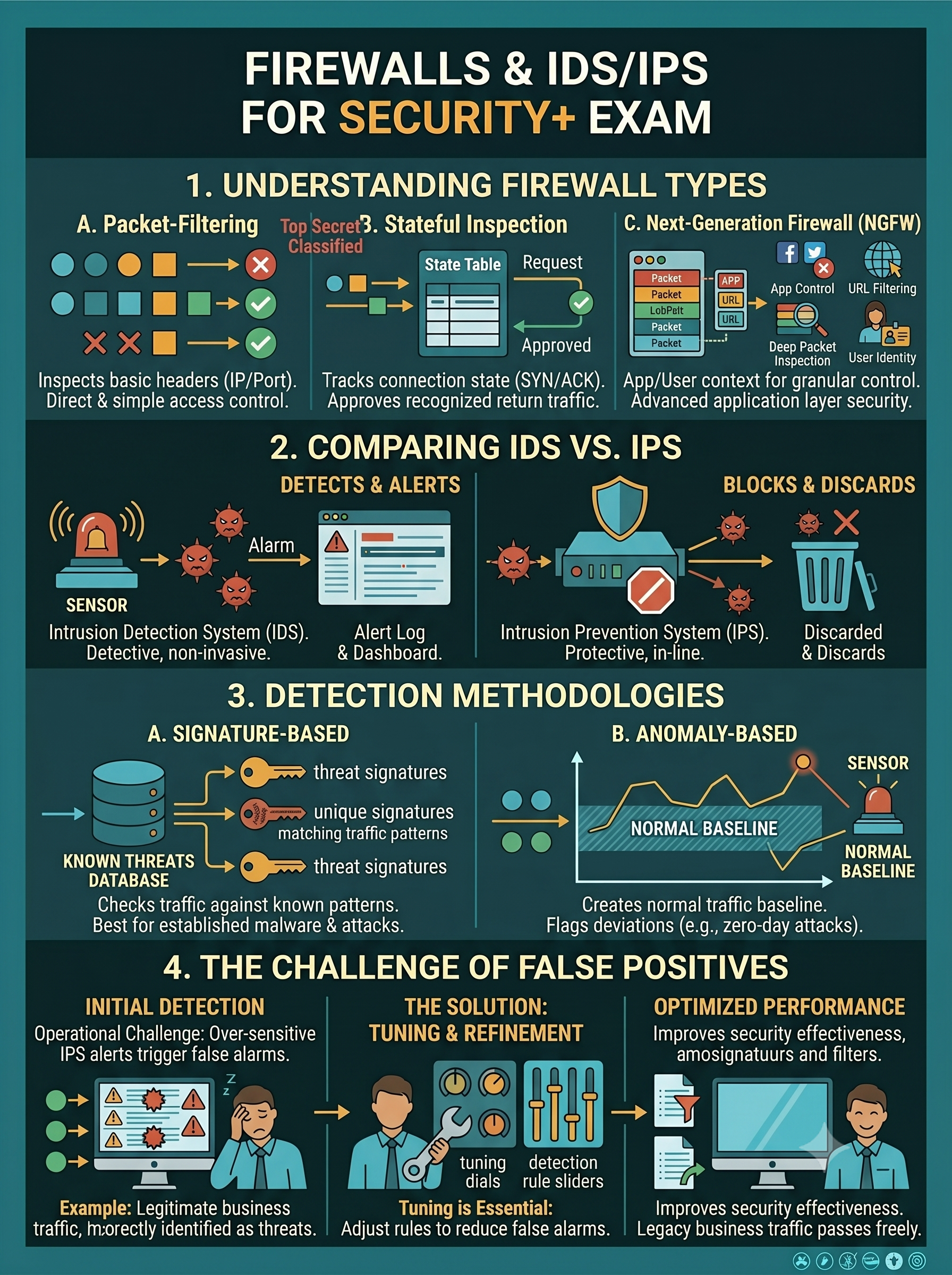
Firewalls enforce access control at the network boundary. NGFWs add application awareness and deep packet inspection. IDS alerts on threats; IPS blocks them inline. Detection methods: signature (known threats) vs. anomaly (behavioral deviation). False positives are the key operational challenge for IPS.

02

DNS Filtering, NAC & DLP

Controlling what domains users can reach, enforcing device compliance before network access, and preventing sensitive data from leaving the organization.

🔄 Click to flip

DNS Filtering, NAC & DLP

DNS filtering blocks malicious domains at the query level — no decryption needed. NAC verifies device compliance (patch level, AV status) before granting access. DLP monitors data in use, in motion, and at rest — preventing unauthorized exfiltration of classified or regulated data.

03

Endpoint Security & Defense in Depth

The last line of defense on every device — EDR, host firewalls, application control — and the enterprise defense-in-depth strategy that sequences all controls into a unified posture.

🔄 Click to flip

Endpoint Security & Defense in Depth

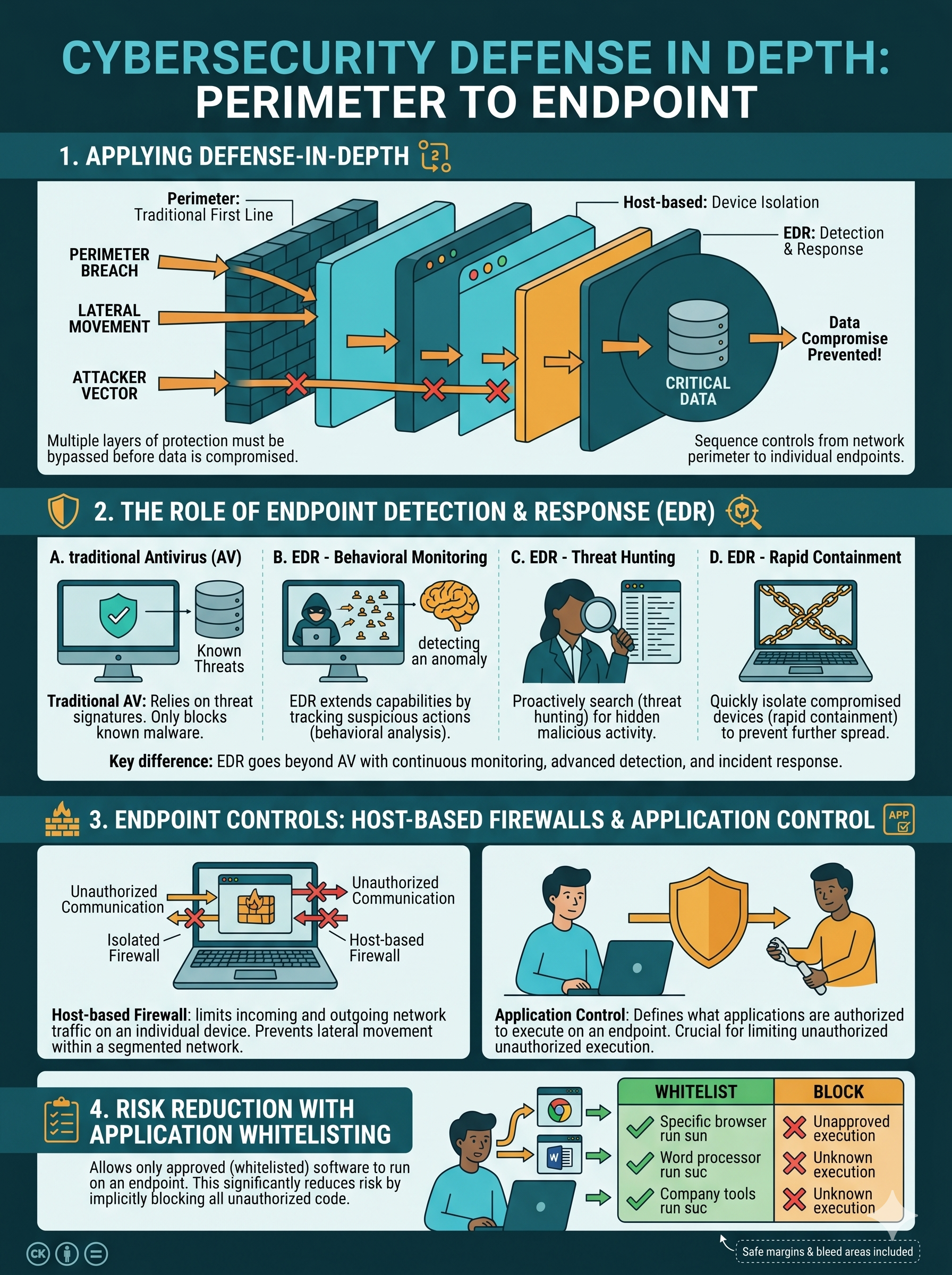
EDR moves beyond antivirus — behavioral monitoring, threat hunting, and containment at the device level. Application whitelisting prevents execution of unauthorized code. Defense in depth sequences controls from perimeter to endpoint so an attacker must defeat every layer. Analogize: concentric security rings around the data.

1

Firewalls & IDS/IPS

The network boundary enforcement and threat detection/prevention layer

The firewall is the foundational network security control — it decides which traffic is allowed into and out of a network segment. IDS and IPS extend that protection by analyzing traffic for attack signatures and behavioral anomalies. Together, they form the core of every enterprise network perimeter defense.

Firewall Types — Evolution and Capabilities

Type How It Works Strengths Limitations / When to Use
Packet Filtering
Layer 3/4
Inspects individual packets based on source/destination IP, port, and protocol. No session awareness — each packet evaluated independently. Very fast; low overhead; simple ACL-based rules. Still used in router ACLs for coarse-grained filtering. Cannot detect split-packet attacks or maintain session state. Use for high-speed coarse filtering, not as primary defense.
Stateful Inspection
Layer 3/4
Tracks the state of active connections in a state table. Only packets belonging to established, legitimate sessions are allowed through. Understands TCP/UDP sessions; blocks unsolicited inbound packets; standard enterprise firewall for 20+ years. Cannot inspect encrypted traffic or application-layer content. Cannot distinguish legitimate web traffic from attack traffic over port 80/443.
NGFW (Next-Generation Firewall)
Layer 3–7
Combines stateful inspection with deep packet inspection (DPI), application identification, user identity awareness, SSL/TLS decryption, and integrated IPS. Application control ("block Dropbox on corporate network"), user-based policies, threat prevention, SSL inspection. Industry standard for modern enterprise. More expensive; SSL inspection raises privacy concerns; requires tuning. Use as the primary perimeter and internal segmentation firewall.
WAF (Web Application Firewall)
Layer 7
Specifically protects web applications by inspecting HTTP/HTTPS request and response traffic. Enforces OWASP rules to detect SQLi, XSS, CSRF, and other application-layer attacks. The only firewall type that protects against web application attacks (SQLi, XSS, SSRF). Can be deployed as inline hardware, software, or cloud service (AWS WAF, Cloudflare). Only protects HTTP/HTTPS — not a general network firewall. Requires tuning to avoid blocking legitimate traffic. Use in front of every public-facing web application.
Proxy Firewall
Layer 7
Acts as an intermediary — all traffic passes through the proxy, which establishes separate connections to both the client and server. Full content inspection possible. Complete content inspection; SSL decryption for inspection; caching for performance; URL categorization and content filtering. Adds latency; requires explicit or transparent configuration; modern HTTPS inspection adds certificate management complexity. Use for web content filtering and egress control.
Analogy — Firewall as Building Security: A packet filtering firewall is like a parking lot gate that opens for any vehicle with the right sticker — it checks a simple credential but can't tell a delivery truck from a getaway car. A stateful firewall is the lobby receptionist who knows which visitors are expected and won't let unscheduled guests past the front desk. An NGFW is a full security desk with biometric check-in, visitor management software, and the ability to scan packages — it knows not just who you are but what you're carrying and whether it's allowed.

IDS vs. IPS — Detect or Block?

🔍 IDS — Intrusion Detection System

IDS monitors a copy of network traffic (via port mirroring / SPAN port) and generates alerts when suspicious patterns are detected. It is passive — it cannot block or modify traffic. Its value is in visibility and forensic logging.

  • Placement: Out-of-band — monitors a mirror of traffic, not inline. Cannot introduce latency or cause outages by misblocking
  • Response: Generates alerts, logs events, sends SIEM notifications — analyst must take action manually
  • Best for: Environments where false positives blocking legitimate traffic are unacceptable (financial trading floors, ICS networks, hospital systems)
  • Limitation: Cannot stop an attack in progress — by the time an analyst responds, the attacker may have already succeeded

🛡️ IPS — Intrusion Prevention System

IPS is deployed inline in the traffic path and actively blocks, drops, or resets connections that match threat signatures or behavioral anomalies. It is the active counterpart to IDS.

  • Placement: Inline — all traffic passes through the IPS. Can introduce latency; failure can cause network outage if not redundant
  • Response: Drops packets, resets connections, blocks source IPs — in real time, before the attacker's payload reaches the target
  • Best for: Internet perimeter, DMZ, and high-risk internal segments where attack prevention outweighs the risk of false positives
  • Risk: False positives block legitimate traffic — a misconfigured IPS can cause application outages. Signature tuning is essential

IDS/IPS Detection Methods

📋 Signature-Based Detection

Compares traffic against a database of known attack patterns (signatures). Like antivirus for network traffic — highly accurate for known threats, zero false positives on mature signatures, but completely blind to zero-day and novel attacks.

  • Pros: Low false positive rate; fast; well-understood
  • Cons: Cannot detect threats not in the signature database; signatures must be continuously updated
  • Example: Detecting a Mimikatz LSASS memory dump by its known tool output pattern

📈 Anomaly-Based Detection

Establishes a baseline of normal behavior and alerts when traffic deviates significantly from that baseline. Can detect zero-day attacks and novel threats — but generates more false positives because "unusual" is not always malicious.

  • Pros: Can detect unknown threats; catches behavioral anomalies signatures would miss
  • Cons: High false positive rate during tuning; baseline must be established before it's useful
  • Example: A workstation that normally transfers 100MB/day suddenly transferring 40GB to an external IP triggers an anomaly alert
Exam Focus — HIDS vs. NIDS: IDS/IPS can be deployed at the network level (NIDS/NIPS — monitors all traffic flowing through a network segment) or the host level (HIDS/HIPS — monitors activity on a single endpoint, including system calls, file changes, and process behavior). HIDS can detect attacks that encrypted network traffic would hide from NIDS, but requires an agent on every monitored host. Expect Security+ scenarios to ask you to choose between them based on visibility requirements.
2

DNS Filtering, NAC & DLP

Controlling domain access, enforcing device compliance, and preventing data exfiltration

These three controls address distinct attack vectors: DNS filtering stops connections to malicious domains before they reach the threat; NAC ensures only compliant, trusted devices connect to the network; DLP prevents sensitive data from leaving through authorized channels being misused. Together they close attack paths that firewalls and IDS/IPS cannot fully address.

DNS Filtering

🌐 How DNS Filtering Works

Every internet connection begins with a DNS query — the device must resolve a domain name to an IP address before connecting. DNS filtering intercepts these queries and blocks resolution of domains that are classified as malicious, phishing, malware distribution, or policy-violating.

  • Mechanism: DNS queries are routed through a filtering resolver (Cisco Umbrella, Cloudflare Gateway, Quad9) that checks each domain against threat intelligence feeds before returning an answer
  • No decryption needed: The domain name is visible even in HTTPS traffic — DNS filtering blocks at the domain level before a connection is established
  • C2 blocking: Most malware callbacks use domain names (not hardcoded IPs) — DNS filtering blocks the callback before the malware can receive instructions
  • Category filtering: Beyond security, DNS filtering can enforce acceptable use policies — blocking gambling, social media, or adult content categories by domain classification

DNS Filtering — Capabilities & Limits

What it stops:

  • Connections to known malware C2 servers
  • Phishing domain visits (typosquatted or newly registered malicious domains)
  • Drive-by download sites classified as malicious
  • Botnet beaconing to command-and-control infrastructure

What it does NOT stop:

  • Attacks that use IP addresses directly (no DNS query needed)
  • Threats hosted on legitimate, unblocked domains (Google Drive malware, OneDrive C2)
  • DNS-over-HTTPS (DoH) traffic that bypasses the filtering resolver — must be blocked at the firewall level
  • Internal/lateral movement attacks that don't generate external DNS queries

Analogy: DNS filtering is like a receptionist who checks whether the person you're calling is on a "known fraudsters" list before connecting your call — if the number is flagged, the call never goes through.

NAC — Network Access Control

🔐 How NAC Works — The Compliance Gate

NAC evaluates every device attempting to connect to the network against a defined security policy before granting access. The evaluation (called a "posture assessment") checks whether the device meets compliance requirements.

  • Pre-admission NAC: Evaluates device compliance before network access is granted. Non-compliant devices are denied or quarantined
  • Post-admission NAC: Continuously monitors devices on the network and revokes access if compliance drops (e.g., AV definition update fails)
  • Agent-based: A software agent on the endpoint reports compliance status. More accurate but requires agent deployment and management
  • Agentless: Uses network scanning, SNMP, or directory integration to assess compliance. Less invasive but less detailed visibility

📋 NAC Posture Assessment Criteria

Common policy requirements checked during NAC evaluation:

  • Operating system version and patch level (e.g., Windows must be at current patch level)
  • Antivirus/EDR installed, running, and definitions current
  • Host-based firewall enabled
  • Disk encryption (BitLocker/FileVault) active
  • Certificate-based device authentication (proves the device is corporate-owned)
  • No prohibited software installed (peer-to-peer clients, unauthorized VPNs)

Quarantine VLAN: Devices that fail posture assessment are placed in a restricted VLAN with access only to a remediation server (Windows Update, AV update server). Once they meet compliance, they are moved to the appropriate production VLAN automatically.

DLP — Data Loss Prevention

📧 DLP in Motion

Monitors data being transmitted over the network — email, web uploads, FTP, cloud sync. If a transmission contains content matching a DLP policy (e.g., a Social Security Number pattern, a document labeled "Confidential"), the DLP system can block, quarantine, or alert.

  • Email DLP: Intercepts outbound email — blocks emails containing credit card numbers, SSNs, or documents with sensitivity labels
  • Web DLP: Inspects HTTP/HTTPS uploads — blocks uploading sensitive files to personal cloud storage (Google Drive, Dropbox)
  • Note: Requires SSL inspection for encrypted traffic analysis

💾 DLP at Rest

Scans data stored in file servers, databases, SharePoint, cloud storage repositories, and endpoint file systems for sensitive content that is misclassified or improperly stored.

  • Discovers PII stored outside approved repositories (SSNs in spreadsheets on a shared drive)
  • Identifies unencrypted sensitive data that should be encrypted
  • Enforces data residency requirements (data must stay in specific geographic regions)
  • Supports data classification labeling and rights management integration

🖥️ DLP in Use

Agent-based DLP deployed on endpoints monitors how users interact with sensitive data in real time — blocking or alerting on policy-violating actions at the device level.

  • Blocks copy/paste of sensitive data to unauthorized applications
  • Prevents saving sensitive documents to personal USB drives
  • Blocks screenshot of classified content
  • Alerts on printing of sensitive documents
  • Logs who accessed what sensitive data and when — supports forensic investigations
Analogy — DLP as a Mail Room: Think of DLP like a corporate mail room where every package going out is X-rayed before it leaves the building. If a package contains something labeled "Top Secret" or "Customer SSNs," the mail room flags it and calls security before it ships. DLP is that X-ray machine — applied to email, web uploads, USB ports, and cloud sync simultaneously. Like a mail room, it can slow things down and needs calibration to avoid blocking legitimate packages, but for regulated industries handling sensitive data, it's non-negotiable.
3

Endpoint Security & Defense in Depth

The device-level security layer — and the enterprise strategy that connects all controls

The endpoint is where data lives, users work, and attackers ultimately want to land. Every attack — whether delivered via phishing, web exploit, or supply chain compromise — eventually executes on an endpoint. Endpoint security is the last line of defense when perimeter controls have been bypassed. Defense in depth is the strategic framework that ensures multiple lines of defense are always between an attacker and their goal.

Endpoint Security Controls

🔬 EDR — Endpoint Detection and Response

EDR is the evolution of antivirus — instead of matching file signatures, EDR monitors endpoint behavior continuously: process creation, file system changes, registry modifications, network connections, and memory operations. It detects threats based on behavior, not signatures, enabling it to identify novel malware and advanced threats.

  • Detection: Behavioral analysis, machine learning models, threat intelligence integration, MITRE ATT&CK framework mapping
  • Response: Automated containment (isolate endpoint from network), process killing, file quarantine, forensic data collection
  • Threat hunting: EDR platforms store telemetry for weeks/months — analysts can query historical data to hunt for indicators of compromise from past attacks
  • Examples: CrowdStrike Falcon, Microsoft Defender for Endpoint, SentinelOne, Carbon Black
  • Exam tip: EDR = behavioral monitoring + automated response + threat hunting. Antivirus = signature matching only

🚫 Application Control & Whitelisting

Application control enforces a policy of which software is allowed to execute on an endpoint. Whitelisting only permits explicitly approved applications — anything not on the list is blocked from running, regardless of whether it is known malware.

  • Whitelisting: Only approved applications run — most restrictive and most effective. Defeats zero-day malware that no signature database has seen
  • Blacklisting: Blocks known-malicious applications — easier to manage but misses unknown threats
  • Windows AppLocker/WDAC: Microsoft's built-in application control — can restrict execution by publisher certificate, path, or hash
  • Challenge: Initial whitelisting is labor-intensive; legitimate software updates must be approved before they can run

🔥 Host-Based Firewall

A software firewall running on each individual endpoint that controls inbound and outbound traffic at the device level — independent of any network firewall. Provides protection even when a device is on an untrusted network (home Wi-Fi, hotel, airport).

  • Blocks unauthorized inbound connections to services running on the endpoint
  • Can restrict which applications are allowed to make outbound connections
  • Essential for laptop users who frequently work outside the corporate perimeter
  • Windows Defender Firewall, macOS Application Firewall, iptables/nftables (Linux)

🔒 Full-Disk Encryption & Patch Cadence

Two foundational endpoint security baselines that address different risk categories:

Full-disk encryption (FDE): BitLocker (Windows), FileVault (macOS) encrypt all data on the disk. If a laptop is stolen, the data is unreadable without the encryption key. Directly satisfies data-at-rest confidentiality requirements for most regulatory frameworks.

Endpoint patch management: The OS and all installed applications on every endpoint must be patched on a defined cadence. Unpatched endpoints are the primary initial access vector for both malware and human attackers exploiting known CVEs.

Defense in Depth — The Enterprise Control Stack

Defense in depth layers controls so that an attacker must defeat every layer to reach their goal. No layer is assumed to be impenetrable — each layer buys time for the next layer to engage and for defenders to detect and respond. Here is a representative enterprise defense-in-depth stack from the internet perimeter inward to the data:

🌐
Layer 1: Perimeter Firewall / NGFW

First barrier — blocks unauthorized inbound and outbound traffic. Application-aware policies deny non-business traffic. SSL inspection decrypts HTTPS for deeper analysis. Defeats: network scanning, direct exploitation of internal services from internet.

📡
Layer 2: IDS/IPS

Analyzes traffic that passes the firewall for attack signatures and behavioral anomalies. Inline IPS drops exploit traffic before it reaches internal systems. Defeats: known exploits, vulnerability scanning, protocol attacks.

🌍
Layer 3: DNS Filtering & Web Proxy

Blocks user access to malicious domains and filters outbound web traffic through a proxy for content inspection. Defeats: phishing link visits, C2 callbacks, malware downloads, botnet beaconing.

📧
Layer 4: Email Security Gateway

Filters inbound and outbound email — strips malicious attachments, blocks phishing links, verifies DMARC/DKIM/SPF, and quarantines suspicious messages. Defeats: phishing, BEC, malware delivery via email attachment.

🔐
Layer 5: NAC & Network Segmentation

Only compliant, authenticated devices connect to the network. Segmentation limits lateral movement — a compromised workstation cannot directly reach the database server. Defeats: unauthorized device access, lateral movement post-compromise.

🖥️
Layer 6: Endpoint Security (EDR + Application Control + HBF)

Behavioral monitoring, process control, and host-level traffic filtering on every endpoint. Even if an attacker lands on a device, EDR detects their tools and techniques; application control prevents unauthorized code execution. Defeats: fileless malware, living-off-the-land attacks, zero-day exploits.

📂
Layer 7: DLP + Data Encryption + Access Control

The final protection layer around the data itself — encryption at rest and in transit, least-privilege access control, and DLP to prevent unauthorized exfiltration. Even if all other layers are bypassed, encrypted data with enforced access control limits the damage. Defeats: insider exfiltration, data theft post-compromise.

Analogy — Medieval Castle Defense: Defense in depth is exactly how medieval castles were designed. The outer moat (perimeter firewall) stops most attackers from even reaching the walls. The drawbridge mechanism (IPS) drops if someone hostile gets through the moat. The outer wall (DNS/email filtering) blocks projectiles. The inner wall (NAC/segmentation) separates the outer courtyard from the keep. The keep itself (endpoint security) is a hardened fortress. The vault in the keep's basement (DLP + encryption) requires a separate key even if the keep falls. An attacker must breach every layer — defenders only need to stop them at one.

Matching Controls to Threats — The Core Exam Skill

🎯 Control-to-Threat Mapping Framework

Security+ scenario questions frequently describe a threat and ask which control addresses it. Use this framework to match them:

  • Unauthorized network access / non-compliant device → NAC
  • Malware C2 callback / phishing domain visit → DNS Filtering
  • Employee emailing SSNs to personal account → DLP
  • Web application SQLi / XSS attack → WAF
  • Port scanning / network intrusion attempt → IDS/IPS
  • Fileless malware / behavioral attack on endpoint → EDR
  • Unauthorized application execution → Application Whitelisting
  • Unauthorized network traffic between segments → Firewall / ACL

⚠️ Common Exam Traps

  • IDS vs. IPS: If the scenario asks for a control that BLOCKS traffic, the answer is IPS. If it only needs to DETECT and ALERT, it's IDS. "Monitor and alert" = IDS; "prevent in real time" = IPS
  • Firewall vs. IPS: Firewalls enforce access control by port/IP/protocol. IPS inspects content for attack signatures. Both can block — but IPS acts on what's in the packet, not just where it's going
  • DLP vs. Firewall: A firewall blocks by destination; DLP blocks by content. If the threat is data leaving through an authorized channel (email, approved cloud storage), a firewall won't stop it — DLP will
  • NAC vs. Authentication: Authentication proves who you are; NAC proves your device is compliant. A user can authenticate perfectly and still be quarantined by NAC if their laptop lacks current patches
Activity 1

Control-to-Threat Matcher — Drag & Drop

Match each threat scenario to the security control that BEST addresses it

Instructions: Each chip describes a specific security threat or incident. Drag it to the control zone that is most directly designed to address that threat. Submit for graded feedback. Click × on a placed chip to return it to the pool.
Port scan from internet IP reaching internal subnet
Malware beaconing to a known C2 domain
Personal laptop with outdated AV connecting to corp Wi-Fi
Employee uploads confidential contract to personal Google Drive
SQL injection payload in HTTP request to web server
Fileless malware running in PowerShell memory — no disk artifact
User clicks phishing link to typosquatted bank domain
Email with 10 SSNs sent to external recipient
RDP access from internet to internal server on port 3389
Ransomware encrypting files — unknown malware variant
Firewall / NGFW
IDS / IPS
DNS Filtering
NAC
DLP
EDR / Endpoint Security
Activity 2

Network Defense Scenario Analyzer

Select a real-world incident and identify which controls failed, which should have been deployed, and why

Instructions: Select a scenario tab below. Read the incident description, then answer each analysis question individually for graded feedback and detailed explanations.
🔴 Scenario A: Manufacturing Company Ransomware Incident
A manufacturing company's file server is encrypted by ransomware. Investigation reveals: (1) An employee received a phishing email with a malicious macro-enabled Word document. (2) The employee's laptop was running Windows 10 with patches 6 months out of date and no EDR — only legacy antivirus. (3) After the macro executed, the malware made a DNS query to a known ransomware C2 domain to retrieve the encryption key. (4) The malware then spread laterally through the flat network, encrypting the file server and two additional workstations. (5) No DNS filtering was in place. (6) Network segmentation was not implemented — all devices were on the same /24 subnet.
Q1: Which SINGLE control, if deployed at the DNS level, would most likely have stopped the ransomware from completing its encryption routine?
Q2: The malware spread to two additional systems through the flat /24 network. Which architectural control would have MOST limited this lateral movement?
🟠 Scenario B: Insider Data Exfiltration
A financial services company discovers that a departing employee copied 14,000 customer account records to a personal USB drive during their final week of employment. The HR system had already begun the offboarding process, but the employee's Active Directory account was not disabled until the day they physically left the building. There was no DLP solution in place. The USB port policy allowed any USB device to be plugged into workstations. The discovery was made three weeks later when a competitor began using customer data that matched the stolen records. The employee had legitimate access to the customer database as part of their normal job function.
Q1: Which control would MOST directly have prevented the data from being copied to the USB drive?
Q2: The employee had legitimate database access and the account wasn't disabled until their last day. Which access control process failure contributed MOST to this incident, and what is the correct practice?
🔵 Scenario C: Rogue Device on Corporate Network
During a quarterly security audit, a network scan identifies an unknown device on the corporate network — a Raspberry Pi configured as a wireless access point. The device is transmitting its own Wi-Fi SSID called "CorpGuest" and routing traffic through the corporate LAN. Any device that connects to this rogue AP is on the corporate network with full internal access. Investigation reveals a contractor connected the device behind a conference room switch port three weeks ago. The corporate network uses 802.1X authentication for employee laptops but the conference room switch ports were not configured to require authentication. The rogue AP has been collecting credentials from connecting devices via a captive portal that mimics the corporate login page.
Q1: Which control, applied to the conference room switch port, would have PREVENTED the rogue device from connecting to the corporate network?
Assessment

Knowledge Check: Network & Infrastructure Security

Select the best answer for each question, then submit for graded feedback
Question 1 of 5
A security architect is designing the network defense strategy for a company that processes credit card transactions. The architect wants a control that inspects HTTP and HTTPS traffic directed at the company's payment portal, specifically to detect and block SQL injection and cross-site scripting attacks. Which control is MOST appropriate?
Question 2 of 5
A hospital's network team wants to ensure that only managed, corporate-issued devices with current OS patches and active endpoint protection can access the clinical network segment where EHR systems reside. Personally-owned devices and unmanaged contractor laptops should receive internet-only access via a guest VLAN. Which control BEST implements this requirement?
Question 3 of 5
A security operations team is reviewing an IDS alert that shows a spike of 2,400 alerts per hour — mostly flagging normal employee web browsing as "suspicious HTTP patterns." The volume of alerts is preventing the team from investigating genuinely suspicious events. Which term describes this problem, and what is the MOST appropriate remediation?
Question 4 of 5
An employee working from home inadvertently installs a trojan that, once running, attempts to communicate with its command-and-control server. The employee's corporate laptop has an EDR solution installed. The trojan uses fileless techniques — running entirely in PowerShell memory with no executable file on disk. Which statement BEST describes how EDR addresses this threat compared to traditional antivirus?
Question 5 of 5
A company's DLP solution is configured to block outbound email containing Social Security Numbers (SSNs) that match a regex pattern for XXX-XX-XXXX. An analyst discovers that a malicious insider has been successfully exfiltrating SSNs by typing them without hyphens (e.g., 123456789 instead of 123-45-6789) — the DLP system did not flag these emails. Which statement BEST describes this situation, and the appropriate remediation?