By the end of this lesson, you will be able to:
- Classify threat actor types by their characteristics, capabilities, motivation, and level of sophistication.
- Explain how supply chain attacks compromise targets indirectly through trusted vendors or software dependencies.
- Identify common attack vectors and describe how each one is used to gain initial access to a target environment.
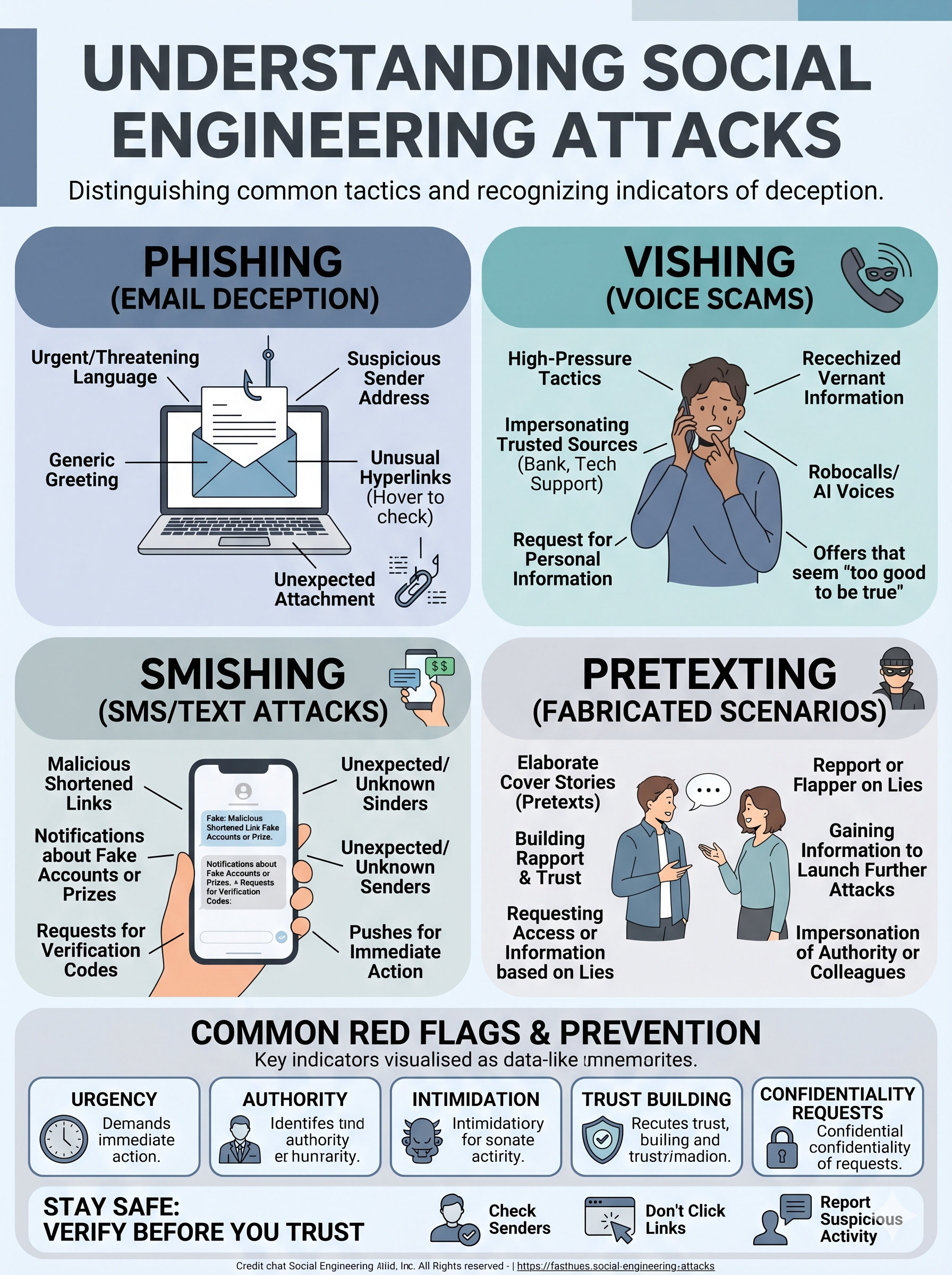
- Distinguish among social engineering tactics — including phishing, vishing, smishing, and pretexting — and recognize indicators of each.
- Categorize common malware families by their behavior, propagation method, and primary objective.
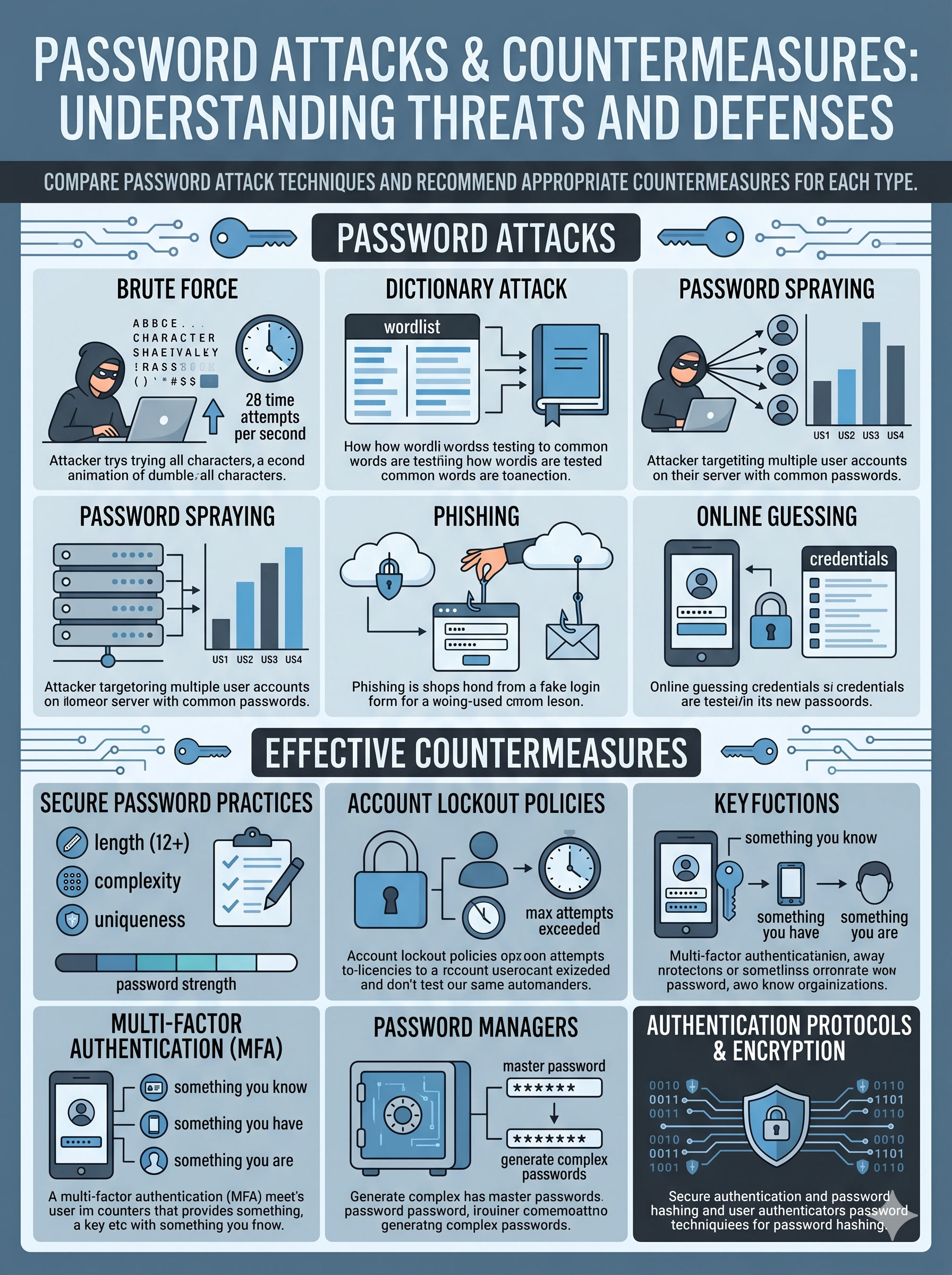
- Compare password attack techniques and recommend appropriate countermeasures for each type.
- Apply threat actor profiling to a real-world attack scenario and recommend appropriate mitigations aligned to the attack vector used.
In Lessons 1 and 2, you built the conceptual and cryptographic foundation of security. Now it's time to think like the adversary. Every security control you will study for the rest of this course exists because of a specific threat actor with a specific goal using a specific technique. Understanding who attacks organizations — their motivations, tools, and methods — is what transforms a technician who configures firewalls into a security professional who understands why the firewall rules are what they are.
The Threats, Vulnerabilities, and Mitigations domain carries 22% of the Security+ exam — the second-highest weight. CompTIA tests this domain almost entirely through scenario-based questions: you will read a brief incident description and be asked to identify the threat actor type, the attack vector used, or the most appropriate mitigation. The vocabulary and frameworks in this lesson are the prerequisite for answering every one of those questions correctly.
Threat Actors & Motivations
Nation-states, cybercriminals, hacktivists, insiders, and script kiddies — who they are and what drives them.
Threat Actors & Motivations
Threat actors range from nation-state APTs with unlimited resources to opportunistic script kiddies running downloaded tools. Their motivations include financial gain, espionage, ideology, revenge, and notoriety. Matching actor to motivation predicts behavior.
Attack Vectors & Social Engineering
How attackers get in — from phishing emails and malicious USBs to supply chain compromises and social manipulation.
Attack Vectors & Social Engineering
Attack vectors are the pathways adversaries use to reach their target. Phishing remains the #1 initial access method. Social engineering exploits human psychology — urgency, authority, trust — rather than technical flaws. Supply chain vectors bypass perimeter defenses entirely.
Malware & Password Attacks
Ransomware, trojans, rootkits, spyware, and more — plus brute force, credential stuffing, and rainbow table attacks.
Malware & Password Attacks
Malware is software designed to damage, disrupt, or gain unauthorized access. Each type has a distinct behavior profile. Password attacks target the weakest link in authentication — from offline dictionary attacks to spraying against cloud identity providers.
Threat Actors & Motivations
Who attacks organizations, what drives them, and how their capabilities differ
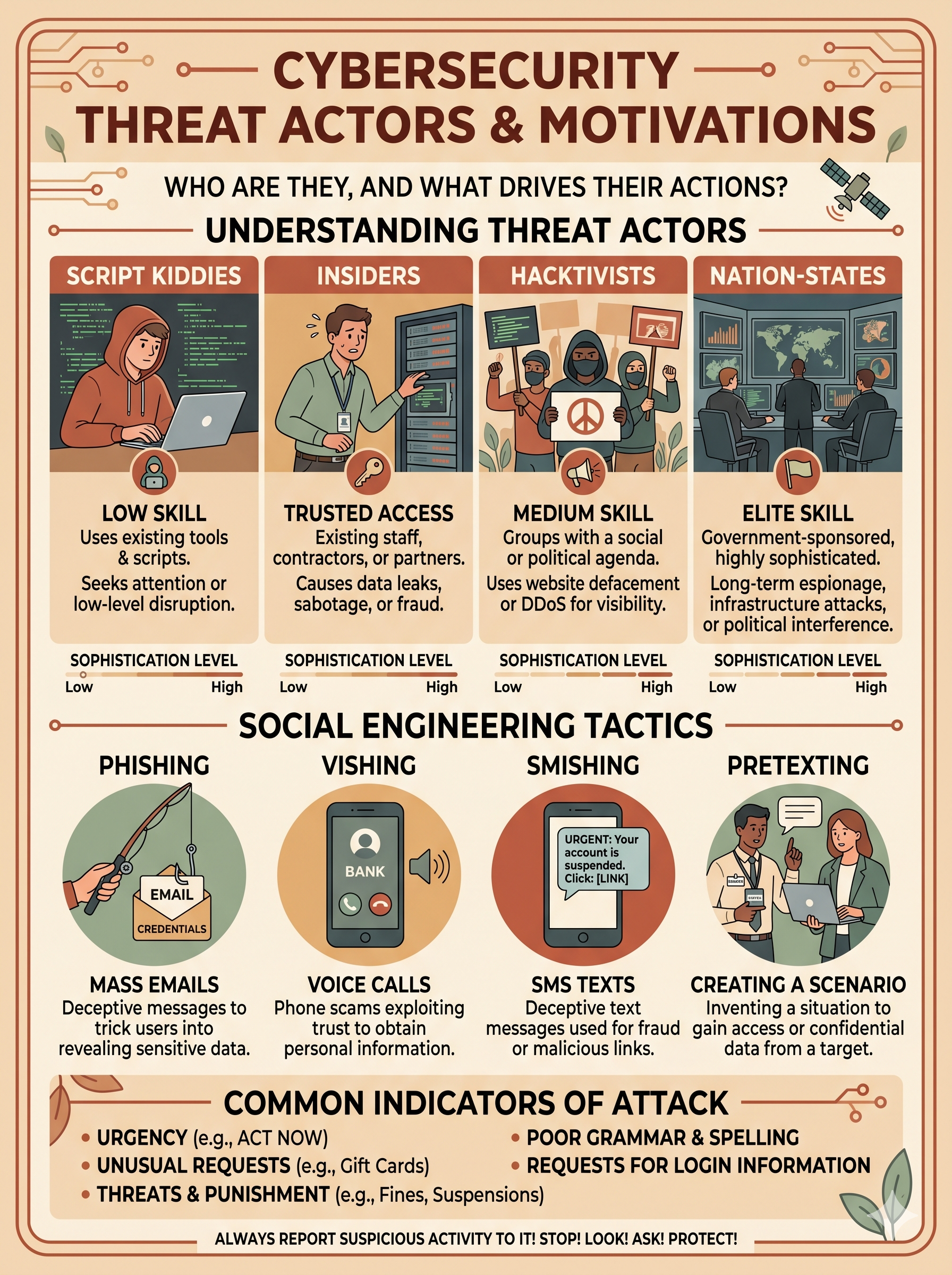
Effective defense begins with understanding your adversary. Security+ expects you to match threat actor types to their defining characteristics — particularly their motivation, sophistication, funding level, and typical target profile. These factors directly influence the tools, techniques, and procedures (TTPs) an actor employs.
🏛 Nation-State / Advanced Persistent Threat (APT) High Threat
Motivation: Espionage, sabotage, intellectual property theft, geopolitical advantage.
Funding: Government-backed — essentially unlimited resources.
Sophistication: Highest. Develop zero-day exploits, custom malware, and conduct long-dwell-time intrusions (months to years).
Examples: APT29 (Cozy Bear / Russia), APT41 (China), Lazarus Group (North Korea).
Key behavior: Patient, stealthy, persistent. Goal is intelligence collection or pre-positioning for future disruption rather than immediate financial gain.
💰 Organized Cybercriminals High Threat
Motivation: Financial gain — ransomware, banking trojans, fraud, data theft for sale.
Funding: Self-funding through criminal proceeds; operate like businesses.
Sophistication: High to very high. Use Ransomware-as-a-Service (RaaS) platforms, purchase zero-days, and operate affiliate networks.
Examples: LockBit, ALPHV/BlackCat, FIN7.
Key behavior: Profit-driven with rapid escalation. Double extortion (encrypt + threaten to publish data) is now standard operating procedure.
🔰 Hacktivist Medium Threat
Motivation: Ideology, political causes, social activism. Want to embarrass, disrupt, or publicize a message.
Funding: Minimal — loosely coordinated volunteers.
Sophistication: Low to medium. Primarily DDoS attacks, website defacement, and public data dumps. Rarely pursue persistent access.
Examples: Anonymous, KillNet.
Key behavior: Opportunistic targeting tied to current events. Noisy — they want publicity rather than stealth.
😤 Insider Threat Medium–High Threat
Motivation: Financial gain, revenge, coercion, espionage, or simple negligence.
Funding: Not applicable — they already have authorized access.
Sophistication: Variable. The most dangerous aspect is legitimate access — they bypass perimeter controls entirely.
Types: Malicious (intentional harm), Negligent (accidental data exposure), Compromised (account hijacked by external actor).
Key behavior: Difficult to detect because activity blends with normal operations. Behavioral analytics (UEBA) is the primary detection tool.
🎮 Script Kiddie Lower Threat
Motivation: Notoriety, curiosity, thrill-seeking — no sophisticated agenda.
Funding: None. Use freely available tools (Metasploit, Kali scripts).
Sophistication: Low. Cannot develop their own tools; rely entirely on public exploits.
Key behavior: Opportunistic — target organizations with known unpatched vulnerabilities. Noisy and easy to detect. Still dangerous at scale — patch management defeats most script kiddie attacks.
🕵️ Competitor / Corporate Spy Situational Threat
Motivation: Industrial espionage — steal trade secrets, R&D data, customer lists, pricing strategies, or merger/acquisition plans.
Funding: Variable — sometimes backed by a competing organization.
Sophistication: Medium. May hire professional penetration testers or use social engineering (honey trapping, pretexting) rather than technical attacks.
Key behavior: Targeted — focused on specific intellectual property rather than broad network compromise.
Supply Chain Attacks — The Indirect Path
A supply chain attack exploits the trust relationship between an organization and its vendors, suppliers, or software providers. Instead of attacking the hardened perimeter of a major enterprise directly, the adversary compromises a smaller, less-defended supplier and inserts a malicious payload that rides along with a legitimate update or product delivery.
- SolarWinds (2020): Nation-state actors (APT29/Cozy Bear) inserted malicious code into an update of the Orion IT monitoring platform. The trojanized update was digitally signed by SolarWinds and distributed to ~18,000 customers — including U.S. federal agencies and Fortune 500 companies. The malware remained dormant for weeks to evade sandbox detection, then established covert C2 channels.
- 3CX Supply Chain Attack (2023): A trojanized installer for the 3CX VoIP application was distributed through the vendor's official update mechanism, itself a supply chain attack of a supply chain attack (the upstream compromise was a financial software package).
- Why it's devastating: Organizations trust their vendors' signed software. Traditional defenses (perimeter firewalls, antivirus) see the malicious payload as legitimate. Software Bill of Materials (SBOM) and vendor risk management programs are the primary defenses.
Attack Vectors & Social Engineering
The pathways attackers use to reach their targets — technical and human
An attack vector is the specific pathway or mechanism a threat actor uses to gain unauthorized access. Understanding vectors is essential because defenses are designed to close specific vectors — a firewall closes network vectors but does nothing against a phishing email that tricks a user into voluntarily handing over credentials.
| Vector | How It Works | Real-World Examples | Primary Mitigation |
|---|---|---|---|
| Email / Phishing | Malicious link or attachment delivered via email, impersonating a trusted sender | Business Email Compromise (BEC), spear-phishing targeting executives, fake invoice scams | Email filtering, DMARC/DKIM/SPF, security awareness training, MFA |
| Web / Watering Hole | Attacker compromises a website the target is known to visit; malicious code executes on visit | Drive-by downloads, malvertising, JavaScript injections on industry news sites | Web proxies, content filtering, browser hardening, patch management |
| Removable Media | Malicious USB drive left in a parking lot or common area; victim plugs it in | Stuxnet propagated via USB; "USB drop" social engineering in physical penetration tests | USB port restrictions via GPO, endpoint DLP, user training |
| Supply Chain | Malicious code inserted into a trusted vendor's software or hardware supply before delivery | SolarWinds Orion (2020), 3CX Desktop App (2023), compromised hardware components | SBOM, vendor risk assessments, code signing verification, network segmentation |
| Vulnerable Services | Directly exploiting unpatched network-exposed services (RDP, VPN, web applications) | CVE exploitation of outdated Exchange servers, Log4Shell, ProxyLogon | Patch management, vulnerability scanning, attack surface reduction, WAF |
| Physical Access | Direct physical intrusion — tailgating, social engineering security guards, using found credentials | Attacker plugs a rogue device into a network port; dumpster diving for discarded documents | Badge access controls, visitor management, clean desk policy, security guards |
Social Engineering Tactics — The Human Attack Surface
Social engineering is the art of manipulating people into violating security policies. It is the most effective initial access technique because it bypasses all technical controls — no firewall, IDS, or encryption protects against a user who voluntarily types their password into a fake login page. Security+ tests specific technique names and their distinguishing characteristics.
🎣 Phishing
Mass-distributed deceptive emails impersonating trusted organizations (banks, Microsoft, HR). Goal: steal credentials, deliver malware, or harvest personal data. Uses urgency and fear ("Your account will be suspended in 24 hours").
🎯 Spear Phishing
Highly targeted phishing using personal research — the attacker knows the victim's name, role, colleagues, and projects. Far higher success rate than generic phishing. Whaling = spear phishing targeting C-suite executives.
📞 Vishing
Voice phishing — phone calls impersonating IT support, the IRS, bank fraud departments, or HR. AI voice cloning is now used to impersonate known individuals. Attacker uses urgency and authority to extract information or actions.
📱 Smishing
SMS-based phishing — malicious links delivered via text message. Exploits the higher trust users place in SMS vs. email and the fact that SMS lacks the same filtering infrastructure as corporate email gateways.
🎭 Pretexting
Creating a fabricated scenario (pretext) to justify an unusual request. Example: calling an employee claiming to be an auditor who needs their login to resolve a compliance emergency. The scenario provides psychological cover for the victim's compliance.
🎁 Baiting
Luring victims with something appealing — a free USB drive, software download, or prize. The "gift" contains malware. Physical baiting (dropping USB drives in parking lots) is surprisingly effective; studies show ~45% of dropped drives get plugged in.
🚪 Tailgating / Piggybacking
Following an authorized person through a secured door without using credentials. Exploits politeness — most people hold doors for others. Piggybacking = victim is aware and consents (still a security violation). Defeated by mantraps and security awareness.
🔄 Business Email Compromise (BEC)
Attacker impersonates a CEO or CFO (via account takeover or domain spoofing) and instructs finance staff to initiate an urgent wire transfer. FBI reports over $50B in losses globally. Authentication: verify large transfers via a known phone number — not email.
Malware Categories
Software designed to damage, disrupt, or gain unauthorized access — classified by behavior and objective
Malware is not a single thing — it is a taxonomy of software tools, each designed for a specific purpose. Security+ requires you to identify malware types by their defining behavioral characteristics, not just by name. In the wild, most sophisticated attacks use multiple malware types in combination.
Ransomware
Encrypts victim files or entire systems, rendering them inaccessible. Demands cryptocurrency payment for the decryption key. Modern variants use double extortion: exfiltrate data first, then encrypt — threaten public release if ransom isn't paid. Ransomware-as-a-Service (RaaS) allows non-technical criminals to deploy sophisticated ransomware through affiliate programs.
- Notable: WannaCry, LockBit, ALPHV/BlackCat, Cl0p
- Defense: Immutable backups, network segmentation, EDR, patch management
- Exam tip: Ransomware targets Availability and Confidentiality simultaneously
Trojan Horse
Malicious code disguised as or bundled with a legitimate application. The user installs what appears to be useful software; the payload executes in the background. Unlike viruses, Trojans do not self-replicate — they rely on user action for installation.
- Notable: Emotet (banking trojan → malware dropper), Zeus, Remcos RAT
- Sub-type: Remote Access Trojan (RAT) gives attacker complete remote control
- Defense: Application whitelisting, code signing verification, user training
Virus
Self-replicating malware that attaches to legitimate files and spreads when the infected file is executed or shared. Requires a host file to propagate — distinguishing it from a worm. File infectors attach to executables; macro viruses target Office documents.
- Notable: ILOVEYOU, Melissa, Conficker (worm/virus hybrid)
- Defense: Antivirus/EDR with behavioral analysis, email attachment scanning
- Key distinction: Virus needs a host file; worm is self-contained and spreads autonomously
Worm
Self-replicating malware that spreads across networks autonomously — no host file or user action required after initial execution. Worms exploit network vulnerabilities to propagate, consuming bandwidth and resources. Can deliver destructive payloads or install backdoors at scale.
- Notable: WannaCry (exploited EternalBlue/SMB), Stuxnet, Morris Worm (1988)
- Defense: Network segmentation, firewall rules, rapid patching of network-exposed vulnerabilities
Rootkit
Malware designed to hide its presence and the presence of other malware from the operating system and security tools. Operates at the kernel level (most dangerous), hypervisor level, or firmware level. Because it subverts the OS itself, traditional antivirus running on the same OS may not detect it.
- Detection: Requires offline scanning, memory forensics, or integrity checking against known-good hashes
- Defense: UEFI Secure Boot, TPM-based attestation, kernel integrity monitoring
- Exam tip: Rootkits provide persistence and stealth — they are enablers for other malware
Spyware & Keylogger
Spyware monitors user activity and exfiltrates data — browsing history, credentials, financial information — to the attacker. Keyloggers specifically record every keystroke, capturing passwords, credit card numbers, and sensitive communications. Both operate silently in the background and may be installed by a Trojan or RAT.
- Notable: Pegasus (nation-state mobile spyware), FinFisher, AgentTesla
- Defense: EDR, network monitoring for unusual outbound connections, MFA (reduces value of stolen passwords)
Botnet & C2
A botnet is a network of compromised systems (bots/zombies) controlled by an attacker through a Command-and-Control (C2) server. Bot operators rent or use their botnet for DDoS attacks, spam campaigns, credential stuffing, and cryptomining. Modern botnets use encrypted, peer-to-peer C2 communication to resist takedown.
- Notable: Mirai (IoT botnet), Emotet botnet infrastructure, TrickBot
- Defense: DNS sinkholes, C2 domain blocking, network anomaly detection, IoT security
Cryptojacker
Malware that hijacks a victim's computing resources — CPU, GPU — to mine cryptocurrency for the attacker's benefit. Victim symptoms include degraded system performance, increased power consumption, and overheating. Often delivered via compromised websites (browser-based mining) or as a Trojan payload.
- Defense: Browser content security policies, ad blockers, EDR with anomalous process detection
- Exam tip: Cryptojacking targets Availability (performance impact) but not Confidentiality or Integrity
Password Attack Techniques
How attackers compromise credentials — and how to defend against each method
Passwords remain the most common authentication mechanism and therefore the most targeted. Password attacks range from automated brute-force approaches to sophisticated offline cracking using GPU clusters. Understanding each technique is essential for recommending appropriate countermeasures — account lockout, MFA, salted hashes, and length requirements each defend against different attack types.
| Attack Type | How It Works | Best Used Against | Primary Defense |
|---|---|---|---|
| Brute Force | Systematically tries every possible character combination until the correct password is found. Guaranteed to succeed eventually — limited only by time and computational resources. | Short or simple passwords; offline hash files where no lockout exists | Account lockout policies, long passwords (12+ chars), MFA, CAPTCHAs |
| Dictionary Attack | Uses a pre-compiled wordlist of common passwords, dictionary words, and known compromised passwords (RockYou list). Far faster than pure brute force because most users choose guessable passwords. | Common passwords; previously breached credential databases | Password complexity requirements, blocklisting common passwords, MFA |
| Credential Stuffing | Uses username/password pairs from previous data breaches to attempt login on other services, exploiting password reuse. Highly automated using bots. Targets: banking, email, streaming services. | Users who reuse passwords across multiple sites | MFA (defeats stuffing even with correct credentials), password managers, breach monitoring (HaveIBeenPwned) |
| Password Spraying | Attempts a small number of commonly used passwords (e.g., "Spring2024!", "Company123") across a large number of accounts. Avoids lockout thresholds because each account only receives 1–2 attempts. | Cloud/SaaS identity providers (M365, Okta); environments with lockout policies | MFA, anomaly detection (many accounts, few attempts), conditional access policies, blocklisting common passwords |
| Rainbow Table Attack | Uses pre-computed tables mapping plaintext passwords to their hashes. Extremely fast for hash cracking — no computation required, just lookup. Defeated by cryptographic salting. | Unsalted password hashes stolen from databases | Password salting (adds random data before hashing — unique hash per password), use of bcrypt/Argon2 (slow hashing algorithms) |
| Pass-the-Hash (PtH) | Attacker captures an NTLM hash from memory (using tools like Mimikatz) and uses it to authenticate to other systems without cracking the underlying password. Exploits NTLM's challenge-response design. | Windows environments using NTLM authentication; lateral movement after initial compromise | Privileged Access Workstations (PAW), disabling NTLM where possible, Kerberos enforcement, Protected Users security group |
Salting and Hashing — Why They Matter Together
A salt is a unique random value added to each password before hashing. Even if two users have the same password, their salted hashes will be completely different. This defeats pre-computation attacks (rainbow tables) because the attacker cannot build a universal table — they would need a separate table for every possible salt value.
- MD5/SHA-1 hashes: Cryptographically broken — fast to compute and crack at scale
- bcrypt: Designed to be slow — intentionally computationally expensive to crack
- Argon2: Current best practice — memory-hard, resistant to GPU-based cracking
- Exam tip: Salting defeats rainbow tables. Slow hashing (bcrypt/Argon2) slows brute force and dictionary attacks
Defense-in-Depth for Authentication
No single password control is sufficient. A layered approach combines multiple defenses to create meaningful friction at every attack stage:
- Length over complexity: A 20-character passphrase is stronger than a complex 8-character password
- MFA: Renders credential theft largely irrelevant — attacker needs the second factor too
- Password managers: Eliminate password reuse by generating and storing unique credentials per site
- Breach monitoring: Services like HaveIBeenPwned alert users when their credentials appear in breach datasets
- Passwordless: FIDO2/WebAuthn replaces passwords entirely with cryptographic authentication
Threat Actor Profiler — Drag & Drop
Match each attack scenario to the most likely threat actor type
Attack Chain Scenario Analyzer
Select a real-world attack scenario, identify the vector and techniques used, and recommend mitigations
Knowledge Check: Threat Actors & Attack Surface
Select the best answer for each question, then submit for graded feedback